Google Sheets for Chrome Review- Your Spreadsheets, One Click Away
Read our review of the Google Sheets Chrome extension. Learn about quick access, offline editing, collaboration features, and if it’s right for your workflow.
Introduction: Streamlining Your Spreadsheet Workflow
In today’s fast-paced digital world, efficiency is key. Google Sheets has become a go-to tool for millions of people, offering a powerful and free alternative to traditional spreadsheet software. But constantly navigating through tabs or opening a new browser window to access your documents can disrupt your workflow. The Google Sheets for Chrome extension aims to solve this by putting your spreadsheets right at your fingertips. This review explores its features, benefits, and limitations to help you decide if it’s the right tool for you.
What is the Google Sheets for Chrome Extension?
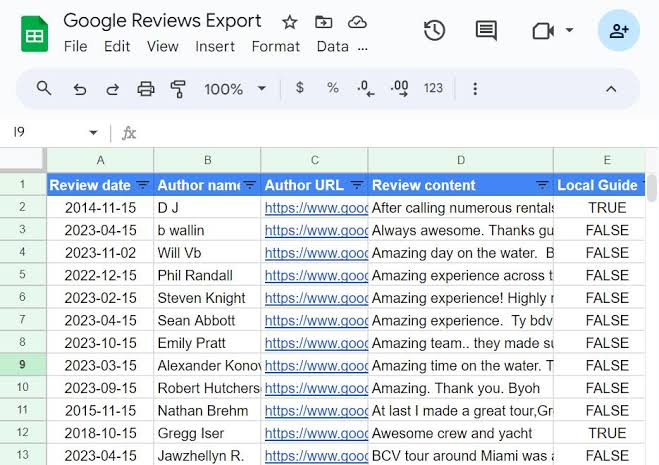
The Google Sheets for Chrome is a browser extension that provides quick and direct access to your Google Sheets documents. It serves as a convenient launcher and management tool, allowing you to create new spreadsheets, open recent files, and work on your documents directly from your browser toolbar.
Unlike a full desktop application, this extension is a lightweight companion to the powerful web-based Google Sheets platform. It’s designed to streamline access and basic operations, making it incredibly convenient for users who work with spreadsheets regularly.
Key Features and Functionality
Quick and Direct Access
The primary benefit of this extension is its ability to put your spreadsheets just one click away. Instead of navigating to the Google Sheets website, you can simply click the extension icon in your Chrome toolbar to access your files instantly.
- Create New Sheets: Start a new, blank spreadsheet directly from the extension.
- Open Recent Documents: See a list of your most recently accessed files and open them instantly.
- Seamless Integration: It integrates directly into your Chrome browser, providing a smooth and uninterrupted workflow.
Real-Time Collaboration
One of the most powerful features of Google Sheets is its collaboration capabilities, and this extension supports that fully.
- Multiple Editors: Multiple people can edit the same spreadsheet at the same time.
- See Changes Instantly: Changes made by collaborators appear in real time.
- Commenting: You can leave comments and have discussions within the document.
- Share & Permissions: Easily share your spreadsheets with others and adjust their viewing or editing permissions.
Offline Accessibility
A major advantage of the extension is its support for offline work. While Google Sheets is primarily a cloud-based tool, you can enable offline access to continue working without an internet connection.
- Work Anywhere: Edit your spreadsheets even when you’re offline.
- Automatic Sync: Changes made offline are automatically synced to the cloud once your connection is restored.
Automatic Saving
Gone are the days of worrying about losing your work. Just like the web version, the extension offers automatic saving. Every edit you make is saved instantly to Google’s cloud, providing peace of mind and protecting against unexpected data loss.
Performance and Limitations
While the extension excels at providing quick access and basic functionality, it’s important to be aware of its limitations.
Performance with Complex Files
As a lightweight wrapper, the extension may not handle extremely large or complex spreadsheets as efficiently as the full Google Sheets webpage. Users may experience slower performance when working with:
- Large datasets with thousands of rows.
- Files with complex formulas and heavy calculations.
- Spreadsheets with many collaborators editing simultaneously.
Advanced Features Require the Full Webpage
While the extension is perfect for quick edits, it is not designed to support the most advanced functionalities of Google Sheets. For more complex tasks, you will need to open the full Google Sheets webpage.
- Scripting and Automation: Advanced features like Google Apps Script require the full web interface.
- Third-Party Add-ons: Many powerful add-ons are only accessible from the full Google Sheets website.
- In-Depth Data Analysis: Tools like pivot tables and advanced charting are better handled on the full page.
Who Is This Extension For?
The Google Sheets for Chrome extension is an excellent tool for a specific type of user:
The Casual User
If you primarily use spreadsheets for simple tasks like tracking expenses, making to-do lists, or organizing project details, this extension is perfect. It provides a quick and easy way to access and edit your files.
The On-the-Go Professional
For users who are frequently switching between tasks, the extension provides a fast way to pull up a spreadsheet without disrupting your workflow. It’s great for quick data checks or making minor edits on the fly.
The Student
Students can use the extension for group projects, taking advantage of the real-time collaboration features while keeping their documents easily accessible.
Google Sheets vs. Microsoft Excel: A Quick Comparison
It’s helpful to understand where Google Sheets, and by extension this extension, stands relative to Microsoft Excel.
| Feature | Google Sheets | Microsoft Excel (Desktop) |
|---|---|---|
| Platform | Web-based, cloud-native | Desktop application |
| Price | Free (with a Google account) | Subscription-based (Microsoft 365) |
| Collaboration | Excellent real-time collaboration | Collaboration available but less seamless |
| Accessibility | Accessible from any device with a browser | Requires software installation |
| Advanced Features | Extensive, but some are less powerful | Industry standard for very complex tasks |
| Offline Mode | Available (must be enabled) | Fully functional offline |
Frequently Asked Questions (FAQs)
1. Is the Google Sheets for Chrome extension free to use?
Yes, the extension is completely free to use. It is available for any user with a Google account and the Chrome browser.
2. Does the extension work offline?
Yes, you can work offline if you enable the feature in the settings. Your changes will be saved locally and synced to the cloud once you reconnect to the internet.
3. Is this extension the same as the full Google Sheets program?
No, it is a lightweight launcher and management tool. It provides quick access to your files and basic editing, but for advanced features like scripting or using third-party add-ons, you will need to open the full Google Sheets webpage.
4. Can multiple people edit a sheet using this extension?
Yes, the extension supports the same powerful real-time collaboration features as the full Google Sheets web application.
5. Will using the extension slow down my browser?
The extension itself is lightweight. However, working with very large or complex spreadsheets within the extension may lead to slower performance.
Conclusion: A Convenient Tool for Everyday Tasks
The Google Sheets for Chrome extension is a convenient and efficient tool for anyone who regularly uses spreadsheets. Its ability to provide one-click access to your documents, combined with offline support and powerful collaboration features, makes it a valuable addition to your browser.
While it may not be the best choice for handling massive, complex datasets that require advanced automation, it excels at what it sets out to do: making your everyday spreadsheet tasks easier and more accessible. If you are looking for a way to streamline your workflow, this extension is a simple and effective solution.