
ASIO4ALL Review- The Essential Low – Latency Audio Driver for Windows
Read our comprehensive review of ASIO4ALL, the free universal audio driver that dramatically reduces latency for music production on Windows. Learn about its features and how to set it up.
Introduction: Bridging the Gap Between Hardware and Software
If you’ve ever tried to record music or play a virtual instrument on a Windows computer, you’ve likely encountered a frustrating problem: latency. This is the annoying delay between when you play a note on your MIDI keyboard and when you hear the sound from your computer speakers. For musicians and producers, this delay can derail a creative flow and make recording impossible. ASIO4ALL is a free utility that aims to solve this problem for everyone, regardless of their audio hardware.
What is ASIO4ALL?
ASIO4ALL is a free, hardware-independent driver that enables low-latency audio for Windows. The name “ASIO” stands for Audio Stream Input/Output, a protocol originally developed by Steinberg. ASIO drivers are the standard for professional audio software, allowing them to communicate directly with your sound card.
However, many consumer-grade sound cards (the kind built into most laptops and motherboards) don’t come with their own ASIO drivers. This is where ASIO4ALL steps in. It acts as a “wrapper” or a translator, allowing your standard Windows audio hardware (which uses a protocol called WDM) to communicate with ASIO-compatible applications. This gives users access to professional-level performance without the need for expensive dedicated hardware.
Key Features of ASIO4ALL
Dramatic Latency Reduction
The core function of ASIO4ALL is to drastically reduce audio latency. The software uses sophisticated methods, including WDM Kernel-Streaming, to bypass the higher-latency components of the standard Windows audio stack. It allows you to achieve near-instantaneous response times, which is crucial for playing virtual instruments and monitoring yourself while recording.
Universal Hardware Compatibility
ASIO4ALL’s greatest strength is its universality. It works with virtually any WDM-compatible sound hardware, from high-end onboard chips to basic laptop speakers. This makes it an indispensable tool for hobbyists and traveling producers who need to achieve stable, low-latency monitoring without carrying dedicated, expensive audio interfaces.
System Stability
Unlike some competing drivers, ASIO4ALL is designed to be completely benign to the system. It achieves its performance without installing any kernel-mode components, which are often the source of system crashes. This means you can achieve low latency without risking the stability of your Windows operating system.
No Kernel-Mode Components
It does not overclock your audio hardware or void any warranties.
Free and Accessible
ASIO4ALL is completely free and open-source, making it accessible to anyone who needs it.
How to Set Up ASIO4ALL
Setting up ASIO4ALL is straightforward:
- Download and Install: Download the latest version of ASIO4ALL from the official website and run the installer.
- Open Your DAW: Launch your Digital Audio Workstation (DAW) like Ableton Live, FL Studio, or Cubase.
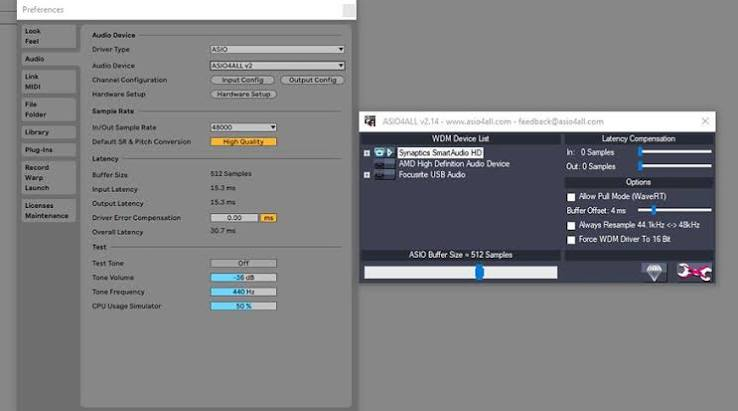
- Select the Driver: Go to the audio settings or preferences menu of your DAW. In the driver selection dropdown, choose “ASIO4ALL v2.”
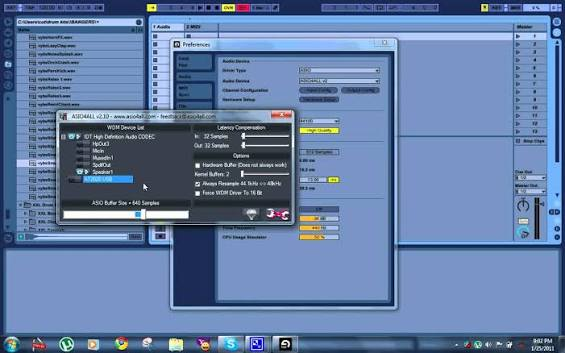
- Configure the Driver: Click on the “Control Panel” or “Settings” button next to the driver selection. This will open the ASIO4ALL configuration panel.
- Enable Your Device: In the configuration panel, you will see a list of your audio devices. Click the power button icon next to your active playback and recording device (e.g., your speakers and microphone) to enable them. This “powers them on” for use with ASIO4ALL.
- Adjust Buffer Size: In the same panel, you can adjust the ASIO buffer size. A smaller buffer size gives lower latency but may cause audio glitches or crackling. A larger buffer size is more stable but introduces more latency. You’ll need to find the best balance for your system.
- Apply and Test: Apply the settings and test your audio. If you hear crackling, try increasing the buffer size slightly.
Pros and Cons of ASIO4ALL
Pros
- Highly accessible: Free and easy to install.
- Hardware-independent: Works with virtually any sound card.
- Dramatically reduces audio latency: Makes real-time monitoring and playing virtual instruments possible.
- Does not affect system stability: No kernel-mode components installed.
Cons
- Configuration panel is often confusing: The interface can be challenging for beginners due to its technical terminology and abstract visual elements.
- Not a replacement for dedicated hardware: While it works for many, a dedicated professional audio interface will generally offer better performance and stability.
- Can be tricky to set up for multiple audio sources: Users may find it difficult to use with multiple sound sources on their computer.
Who Should Use ASIO4ALL?
ASIO4ALL is an essential tool for a specific group of users:
Musicians and Producers
Any musician or producer using Windows who doesn’t have a dedicated audio interface will benefit immensely. It allows them to record and play virtual instruments with acceptable latency.
Beginners and Hobbyists
For those just starting in music production, ASIO4ALL provides a free and effective way to get professional-level performance without the upfront cost of an external audio interface.
Traveling Producers
When you’re away from your studio setup and relying on a laptop’s built-in audio, ASIO4ALL can be a lifesaver, allowing you to keep working on the go.
Podcasters and Voice Actors
Anyone who needs to monitor their own voice in real-time while recording will benefit from the reduced latency ASIO4ALL provides.
Frequently Asked Questions (FAQs)
1. What is ASIO4ALL used for?
ASIO4ALL is a free universal ASIO driver for Windows that dramatically reduces audio latency. It is used by musicians, producers, and podcasters to allow real-time monitoring and playing of virtual instruments.
2. Is ASIO4ALL free to use?
Yes, ASIO4ALL is completely free and open-source software. There are no charges or licensing fees.
3. Does ASIO4ALL work with my audio interface?
ASIO4ALL is primarily designed for consumer-grade sound cards (like the ones built into your motherboard). If you have a professional audio interface, it’s recommended to use the manufacturer’s own ASIO driver for best performance. However, ASIO4ALL can sometimes work as a fallback for interfaces with poor driver support.
4. Is ASIO4ALL better than the drivers that came with my sound card?
If your sound card came with its own ASIO drivers, you should use those. They are specifically designed for your hardware and will likely offer the best performance and stability. ASIO4ALL is a solution for hardware that lacks ASIO drivers.
5. What is the difference between ASIO4ALL and a professional audio interface?
ASIO4ALL is a software solution that uses your existing hardware. A professional audio interface is a dedicated piece of hardware with its own ASIO drivers, high-quality analog-to-digital converters, and often built-in preamps. While ASIO4ALL can significantly improve latency, an audio interface will generally offer superior performance, stability, and overall audio quality.
Conclusion: A Must-Have Utility for Windows Audio
ASIO4ALL is a cornerstone of the Windows music production ecosystem. It democratizes low-latency audio, offering a critical, free solution for musicians, producers, and podcasters who lack dedicated audio interfaces. By acting as a universal ASIO driver, it successfully minimizes the irritating delay that can derail recording sessions. While its configuration panel can be a bit intimidating for beginners, the benefits it provides are immense. It’s a must-have utility in any digital audio workflow, proving that sometimes the best solutions are also the simplest and most accessible.