VPN Gate Client Plug-in with SoftEther VPN Client – Free, Flexible Tunneling
VPN Gate Client Plug-in with SoftEther VPN Client combines a public VPN relay directory and multi-protocol connectivity to streamline secure tunneling. It favors performance and reliability for users who want control over routes and endpoints. Installation ships as a digitally signed installer, reinforcing trust while keeping the toolset lean overall.
Welcome to the ultimate guide for the VPN Gate Client Plug-in with SoftEther VPN Client. This powerful, free-to-use VPN solution from the University of Tsukuba offers something unique in the crowded VPN market: a community-driven network of volunteer-run relays. Unlike commercial VPNs that control all their servers, VPN Gate relies on volunteers worldwide who share their internet connections to help others browse freely and securely.
This comprehensive guide covers everything you need to know about VPN Gate—its core mechanics, the volunteer relay network, multi-protocol support, installation, usage tips, and why this free tool has earned a dedicated following despite its unique challenges.
What Is VPN Gate with SoftEther? An Overview
VPN Gate is an academic research project run by the Graduate School of Science and Technology at the University of Tsukuba, Japan. Its goal is to develop a “Day-by-Day VPN” system where volunteers can become VPN servers, creating a decentralized, censorship-resistant network.
SoftEther VPN (Software Ethernet) is the underlying VPN protocol and client developed by the same university. It supports multiple VPN protocols (SSL-VPN, OpenVPN, L2TP/IPsec, MS-SSTP, and EtherIP) and is designed to be faster than traditional VPNs by using SSL over HTTPS, which resembles ordinary HTTPS communication and easily bypasses firewalls.
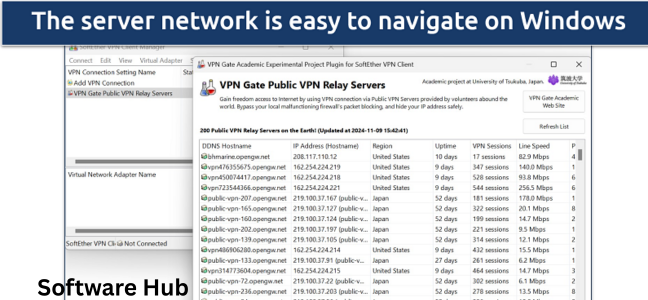
The VPN Gate Client Plug-in integrates with SoftEther VPN Client, providing a directory of public volunteer relays that you can connect to with a single click.
Core features at a glance:
| Feature | Description |
|---|---|
| Type | Academic research VPN |
| Network | Volunteer-run public relays |
| Client | SoftEther VPN Client + Plug-in |
| Protocols | SSL-VPN, OpenVPN, L2TP/IPsec, MS-SSTP, EtherIP |
| Cost | Completely free |
| Platform | Windows |
| Sign-up | Not required |
Why this tool stands out:
| Differentiator | Benefit |
|---|---|
| Free | No subscription, no data limits |
| Decentralized | No single entity controls all servers |
| Multi-protocol | Works where other VPNs are blocked |
| Firewall-friendly | Uses HTTPS ports (443, 80) |
| No sign-up | Privacy-focused, no personal data required |
| Academic research | Legitimate, non-commercial project |
Who is this for?
- Privacy-conscious users seeking a free VPN
- Users in countries with heavy internet censorship
- Advanced users comfortable with some technical complexity
- Anyone wanting to contribute as a volunteer relay
- People who understand the trade-offs of volunteer networks
How VPN Gate Works: The Volunteer Relay Network
The Traditional VPN Model
| Model | Server Ownership | Cost | Reliability |
|---|---|---|---|
| Commercial VPN | Company-owned servers | Monthly fee | High |
| VPN Gate | Volunteer-owned servers | Free | Variable |
The VPN Gate Model
| Component | Description |
|---|---|
| Volunteer servers | Individuals share their internet connection |
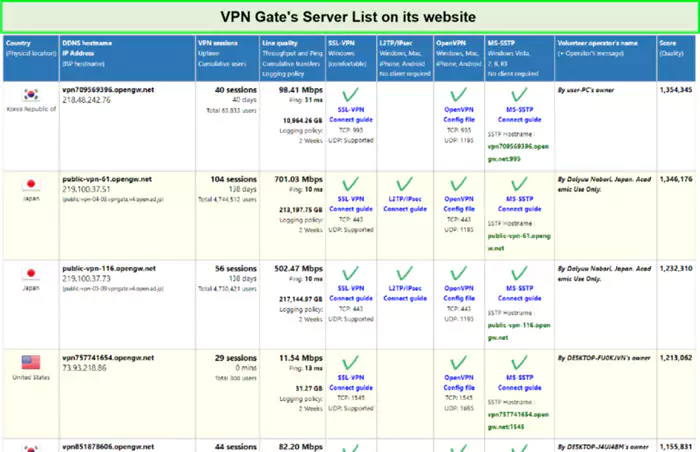
| Public relay list | Directory of available servers |
| SoftEther client | Connects to chosen relay |
| Plug-in | Integrates relay discovery |
How a Volunteer Relay Works
When someone volunteers as a VPN Gate relay:
- They install VPN Gate Server software
- The software registers their public IP with the central directory
- Other users can now connect through their computer
- The volunteer’s bandwidth is shared
Important: This means your traffic exits from a volunteer’s home internet connection, not a professional data center.
The Relay List
The VPN Gate client plug-in fetches a list of currently active volunteer relays, including:
- Country location
- Connection speed
- Number of current users
- Protocol support
SoftEther VPN: The Underlying Technology
SoftEther VPN is a powerful, open-source VPN solution developed at the University of Tsukuba.
Supported Protocols
| Protocol | Use Case | Firewall Friendliness |
|---|---|---|
| SSL-VPN | Primary protocol (SoftEther proprietary) | Excellent (uses HTTPS) |
| OpenVPN | Standard open protocol | Good |
| L2TP/IPsec | Built-in OS support | Moderate |
| MS-SSTP | Microsoft protocol | Good (uses HTTPS) |
| EtherIP | Layer 2 bridging | Variable |
Key Technical Advantages
| Advantage | Why It Matters |
|---|---|
| HTTPS伪装 | Traffic looks like normal web browsing |
| Multiple protocol support | Bypasses various blocking methods |
| High performance | Designed for speed |
| NAT traversal | Works behind home routers |
| Dynamic DNS | Connects even with changing IP addresses |
VPN Gate Client Plug-in Features
Wide Server Choice
| Feature | Benefit |
|---|---|
| Public relay directory | Dozens of volunteer servers worldwide |
| Speed indicators | Choose faster relays |
| Country selection | Access geo-restricted content |
| Regular updates | New relays added continuously |
Flexible Multi-Protocol Connectivity
| Protocol | When to Use |
|---|---|
| SSL-VPN | Default, best performance |
| OpenVPN | When SSL-VPN is blocked |
| L2TP/IPsec | Built into Windows, macOS, iOS |
| MS-SSTP | Windows-native |
Strong Throughput with Firewall-Friendly Transport
| Advantage | Explanation |
|---|---|
| HTTPS ports | Uses 443 (HTTPS) and 80 (HTTP) |
| Looks like web traffic | Hard for firewalls to distinguish |
| Bypasses DPI | Deep packet inspection struggles with HTTPS |
Persistent Sessions Through Background Service Operation
| Feature | Benefit |
|---|---|
| Background service | VPN stays connected even if UI closed |
| Auto-reconnect | Re-establishes connection if dropped |
| System tray access | Quick disconnect/reconnect |
Installation Guide
Step 1: Download the Installer
Download the combined installer from CNET Download or the official SoftEther website. The file is digitally signed, verifying its authenticity.
Note: Be cautious during installation. Some users report bundled software offers. Always select “Custom Installation” and decline any extras.
Step 2: Run the Installer
- Launch the downloaded executable
- Accept the license agreement
- Choose installation directory
- Select components (SoftEther VPN Client + VPN Gate Plugin)
- Complete installation
Step 3: Launch VPN Gate Client
After installation, you will find:
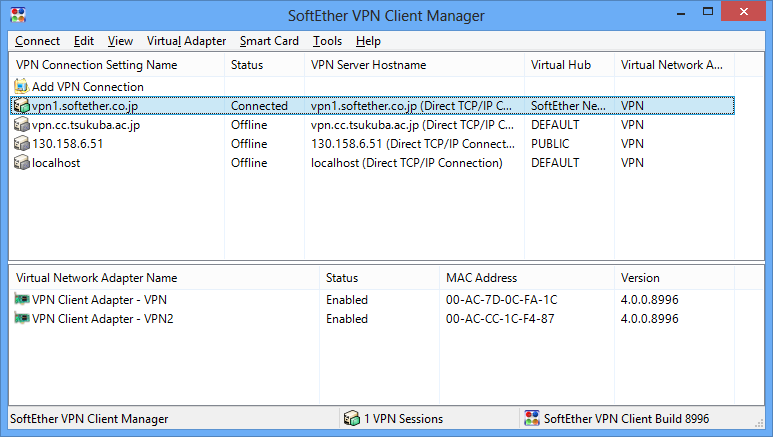
- SoftEther VPN Client Manager (main interface)
- VPN Gate Client Plug-in (relay list)
Step 4: Connect to a Relay
- Open VPN Gate Client Plug-in
- View list of available relays (refreshes automatically)
- Select a relay by country or speed
- Click “Connect”
- Enter a client name (any name works)
- Wait for connection establishment
Usage Guide
Finding a Good Relay
| Strategy | How To |
|---|---|
| Check speed | Look for relays with low latency and high speed |
| Avoid crowded relays | Fewer users = better performance |
| Try different countries | Some are faster than others |
| Test multiple relays | Performance varies by time of day |
Connection Tips
| Tip | Why It Helps |
|---|---|
| Give it a name | When asked for “VPN Client Name,” enter anything |
| Be patient | First connection may take 30-60 seconds |
| Check logs | If connection fails, review error messages |
| Switch protocols | SSL-VPN default; try OpenVPN if blocked |
Disconnecting
Simply click “Disconnect” in the VPN Gate client. The background service will terminate the tunnel.
Pros and Cons Analysis
Advantages
| Pro | Explanation |
|---|---|
| Free | No cost, no data limits |
| No sign-up | No email, no personal information |
| Wide server choice | Dozens of volunteer relays |
| Multi-protocol | Works where other VPNs fail |
| Firewall-friendly | Uses HTTPS ports |
| Academic project | Legitimate, transparent |
Disadvantages
| Con | Explanation |
|---|---|
| Volunteer relays | Stability and speed vary significantly |
| No African servers | Geographic coverage gaps |
| 2-week logging | Relays may log for troubleshooting |
| Learning curve | Requires basic VPN knowledge |
| Background resource use | Service runs continuously |
| Potential speed loss | Can drop from 30Mbps to 1-2Mbps |
User Feedback Summary
| Positive Reviews | Negative Reviews |
|---|---|
| “Easy to use & it’s free!” | “Useless… only works 5% of the time” |
| “Works great!! FREE!!” | “Did not work. Do not download” |
| “One of best Open VPN applications” | “Virtual Pain in the Neck” |
Verdict: VPN Gate works well for some users and poorly for others. Your experience depends on your location, network, and the availability of quality relays.
Security and Privacy Considerations
Logging Policy
| Aspect | Detail |
|---|---|
| VPN Gate | No central logging |
| Volunteer relays | May log for 2 weeks (for troubleshooting) |
| Recommendation | Do not use for highly sensitive activities |
Encryption
| Protocol | Encryption Strength |
|---|---|
| SSL-VPN | AES-256 (strong) |
| OpenVPN | AES-256 (strong) |
Trust Model
| Risk | Mitigation |
|---|---|
| Volunteer may be malicious | Low probability; academic project oversight |
| Volunteer may log traffic | Avoid sensitive activities |
| Connection instability | Use only for casual browsing |
Recommendation: VPN Gate is suitable for casual privacy, bypassing geo-restrictions, and general security. For whistleblowing, financial transactions, or state-level threats, use a trusted paid VPN.
Troubleshooting Common Issues
| Issue | Likely Cause | Solution |
|---|---|---|
| “Need to set up a VPN Client name” | Missing configuration | Enter any name when prompted |
| No relays appear | Network connectivity | Check internet; refresh list |
| Connection drops | Volunteer offline | Try different relay |
| Slow speeds | Congested relay | Switch to less crowded server |
| Can’t connect at all | Firewall blocking | Try OpenVPN protocol |
| Malware protection added | Bundled software | Reinstall; decline extras |
VPN Gate vs. Commercial VPNs
| Feature | VPN Gate | Commercial VPN (e.g., ExpressVPN, NordVPN) |
|---|---|---|
| Cost | Free | $3-12/month |
| Server control | Volunteer relays | Company-owned servers |
| Speed | Variable (often slow) | Generally fast |
| Reliability | Inconsistent | High |
| Customer support | None (community) | 24/7 support |
| Logging | Possible at relay level | No-log policies (audited) |
| Streaming access | Unlikely | Often works |
| Learning curve | Moderate | Easy |
When to choose VPN Gate:
- You need a free VPN
- You are comfortable with technical tools
- You only need occasional, casual VPN use
When to choose commercial VPN:
- You need reliable, fast connections
- You use VPN daily
- You stream geo-blocked content
- You require customer support
Frequently Asked Questions (FAQs)
1. Is VPN Gate really free?
Yes, VPN Gate is completely free. There are no subscription fees, data limits, or paid tiers. The project is funded by the University of Tsukuba as academic research.
2. Is VPN Gate safe to use?
VPN Gate is generally safe for casual use. However, because volunteer relays may log traffic (up to 2 weeks), avoid sending sensitive information. The SoftEther client software is reputable and digitally signed.
3. Why is VPN Gate slow?
Speed depends on:
- The volunteer’s internet connection
- How many users are connected to that relay
- Your distance from the relay
Try switching to a different relay with fewer users.
4. Does VPN Gate work in China?
SoftEther’s SSL-VPN protocol is designed to bypass firewalls by using HTTPS ports (443, 80). Some users report success, while others struggle. Performance varies by time and location.
5. Do I need to sign up for an account?
No. VPN Gate requires no registration, email address, or personal information. Just download, install, and connect.
6. How do I choose the best relay?
Look for:
- High “Speed” rating
- Low “Ping” (latency)
- Few current users
- Geographic proximity (closer is generally faster)
7. What does “2-week logging policy” mean?
Volunteer relays may keep connection logs for up to 2 weeks to troubleshoot issues. VPN Gate itself does not log. For maximum privacy, avoid sending sensitive data.
8. Can I use VPN Gate on my phone?
Yes, but not directly through the VPN Gate client. You can:
- Use OpenVPN app with VPN Gate’s OpenVPN configuration files
- Use L2TP/IPsec (built into iOS/Android) with relay details
9. Why are there no servers in Africa?
VPN Gate depends entirely on volunteers. Currently, few volunteers in Africa have registered as relays. This could change if more volunteers join.
10. Can I become a volunteer relay?
Yes. Anyone with a public IP address and sufficient bandwidth can install VPN Gate Server software and contribute. Check the official VPN Gate website for instructions.
11. Does VPN Gate work with Netflix?
Unlikely. Volunteer relays are not optimized for streaming, and Netflix actively blocks known VPN IP addresses. Use a commercial VPN for streaming.
12. How does VPN Gate compare to Tor?
| Aspect | VPN Gate | Tor |
|---|---|---|
| Speed | Moderate to slow | Very slow |
| Anonymity | Moderate | High |
| Ease of use | Moderate | Easy (Tor Browser) |
| Purpose | Privacy, geo-unblocking | Anonymity |
13. Will VPN Gate hide my IP address?
Yes. Your public IP address will be replaced with the volunteer relay’s IP address.
14. Can I use VPN Gate for torrenting?
Technically yes, but:
- Speed may be poor
- Some volunteers may block P2P
- Your traffic may slow the relay for others
15. What is the difference between SoftEther VPN Client and VPN Gate?
SoftEther VPN Client is the core software for connecting to any VPN server. VPN Gate Client Plug-in adds the public relay directory. Install both to access VPN Gate.
Conclusion: A Unique Free VPN for the Technical User
VPN Gate Client Plug-in with SoftEther VPN Client is a remarkable project—a free, decentralized VPN network powered by volunteers worldwide. It offers genuine privacy benefits, firewall bypass capabilities, and multi-protocol support. For casual use, geo-unblocking, and testing, it is an excellent choice.
However, it is not for everyone. The volunteer relays vary in speed and reliability. There is a learning curve. And the “free” nature comes with trade-offs: potential logging, inconsistent performance, and no customer support.
Key takeaways:
| Aspect | Summary |
|---|---|
| Type | Academic research VPN |
| Cost | Free |
| Network | Volunteer-run relays |
| Best for | Casual privacy, geo-unblocking, testing |
| Not for | Streaming, sensitive activities, reliability-critical use |
| Setup | Moderate (requires basic VPN knowledge) |
| Platform | Windows |
| Verdict | Recommended for technical users who want a free VPN |
If you are comfortable learning new software and can tolerate variable performance, VPN Gate offers an incredible value. If you need guaranteed speed and simplicity, consider a commercial VPN.