Pure APK Install – The Easiest Way to Sideload Apps on Android
In the vast ecosystem of mobile apps, the Google Play Store is the primary source for most users. However, there are times when you need to venture outside this official channel. Perhaps you want to install an app that isn’t available in your region, or maybe you’re looking for an older version of an app that has been removed from the Play Store. This is where APK files come into play, and managing them on your Android device can sometimes be a hassle.
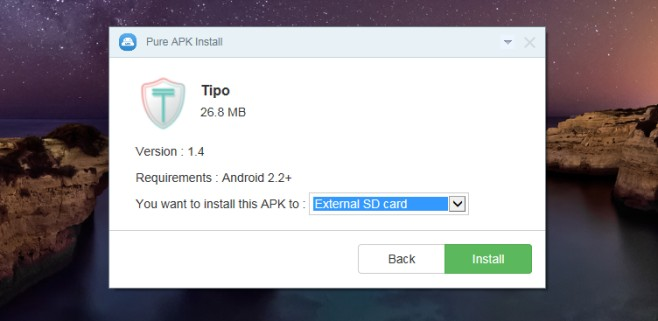
This is where a desktop utility like Pure APK Install steps in. Developed by the team behind the popular APKPure app store, this free Windows tool aims to simplify the process of installing applications on your Android device. This review will explore its features, ease of use, and what users have to say about it.
What is Pure APK Install?
Pure APK Install is a lightweight Windows application designed to help you install APK and XAPK files directly onto your Android smartphone or tablet . Instead of transferring the file to your device and using a file manager to install it, this program connects your PC to your Android device via a USB cable and handles the installation process for you.
The primary goal of the software is to streamline the sideloading process. It eliminates the need to manually move files, find them in your phone’s storage, and initiate the installation. This tool aims to make app management accessible to a wider audience, including those who are not comfortable with the technical steps required for traditional sideloading.
Key Features of Pure APK Install
1. Support for APK and XAPK Files
One of the standout features is its native support for the XAPK format . Standard APK files contain the application’s code, but larger games often come with additional OBB (Opaque Binary Blob) data files . An XAPK file is essentially a package that combines the APK with this OBB data. Pure APK Install automatically extracts and installs both the app and its associated data files into the correct folders on your device .
2. Simple Drag-and-Drop Interface
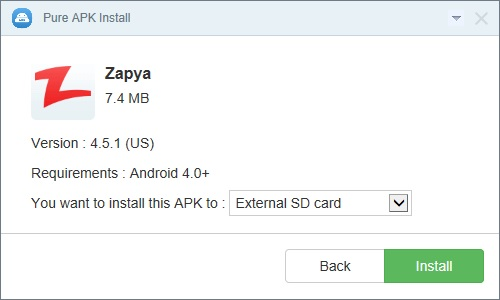
The software boasts a minimalist and intuitive interface. You can install an app simply by dragging and dropping the APK or XAPK file from your PC into the Pure APK Install window . It adheres to a “one-click philosophy” that caters to non-technical users by reducing the process to a few straightforward steps.
3. Broad Device Compatibility
Pure APK Install is designed to support a wide variety of Android brands and models. According to the developer, it works with devices from Samsung, HTC, Motorola, Huawei, LG, Lenovo, Mi, Micromax, and many others . The software also maintains compatibility with older versions of Android (2.3 and above) as well as modern releases like Android 5.1.1 Lollipop and beyond . This versatility makes it useful for both new and legacy devices.
4. Lightweight and Fast
The program is designed to be lightweight and fast, with a quick Windows installation and minimal system requirements. It focuses on its core task of transferring and installing apps without adding unnecessary bloat.
5. Bypass Regional Restrictions
The tool allows you to break through Google Play’s regional restrictions, enabling you to install apps on your device that might otherwise be unavailable in your country.
Pros and Cons at a Glance
Pros
- Easy to Use: The drag-and-drop interface makes it very simple, even for beginners.
- XAPK and OBB Support: Handles complex game installations that include large data files.
- Broad Compatibility: Works with most Android brands and operating systems from Android 2.3 up to Windows 10.
- Lightweight: Minimal system impact and fast operation.
- Free: The software is completely free to download and use.
Cons
- Requires USB Debugging: A significant limitation is that users must manually enable USB Debugging on their Android device. This is a developer option that can be confusing for less tech-savvy users and is a common point of frustration.
- No Advanced Features: The tool does not offer advanced features like batch installation, app uninstallation, or system cleanup. It is purely a one-way installer.
- Potential Connection Issues: Some users may encounter occasional connection hangups that require reconnecting the USB cable or refreshing drivers.
- Misleading Name for Some: As one reviewer pointed out, the name “Pure APK Install” might lead some to believe they can open an APK file on their PC, which is not the case. It is specifically for installing files onto an Android device.
What Users Are Saying
User reviews for Pure APK Install are mixed, but the feedback is fairly consistent. Here’s a breakdown of the general sentiment.
The Positive Experience
Users who need to install large game files (XAPK) or apps from outside the Play Store find the software very useful. It is praised for being a fast and hassle-free way to get apps onto their phones. Many users report that the drag-and-drop functionality works perfectly, making the process seamless.
The Negative Experience
The most common point of frustration is the requirement to enable USB Debugging. For beginners, navigating to the Developer Options menu and finding the right toggle can be a deterrent. Additionally, some users have encountered technical issues, such as the program failing to connect to their device, leading to a “waste of time and effort” as one reviewer put it.
Conclusion
Pure APK Install is a valuable tool for Android users who frequently sideload apps or install large games from sources other than the Google Play Store. Its support for XAPK and OBB files, combined with a simple drag-and-drop interface, makes it an efficient and easy-to-use utility. It removes the technical hurdles of manually copying files and navigating your phone’s storage.

However, the need to manually enable USB Debugging may present a barrier for some users. For those willing to take that step, Pure APK Install offers a reliable and straightforward solution. It is a lightweight, focused tool that does one job well, making it a recommended addition to any Android power user’s toolkit.
Frequently Asked Questions (FAQs)
1. What is Pure APK Install used for?
Pure APK Install is a Windows program that allows you to install APK and XAPK files onto your Android device. It connects to your phone or tablet via a USB cable and handles the installation process, including the extraction and placement of OBB data files for larger games. It’s developed by the APKPure team .
2. What is an XAPK file, and why do I need support for it?
An XAPK file is a package that contains both the app’s APK file and its additional data (OBB) files. This is common for large games. Pure APK Install’s support for XAPK means you don’t need to manually extract and place the OBB data in the correct folder on your device; the software handles this automatically .
3. Is Pure APK Install free to use?
Yes, Pure APK Install is completely free to download and use. It is licensed as freeware with no hidden costs or subscriptions required for its core functionality .
4. Does it work with my Android device?
The software is designed to be compatible with a wide range of Android brands, including Samsung, Huawei, LG, Motorola, Xiaomi, and many others. It supports Android versions starting from 2.3 (Gingerbread) and has been tested on newer versions like 5.1.1 Lollipop .
5. What are the main drawbacks of this software?
The main drawback is that it requires you to manually enable USB Debugging on your Android device. This is a developer option that can be confusing for new users. If this step is not done correctly, the software will not be able to connect to your phone . Other limitations include the lack of advanced features like batch uninstallation and occasional connection hangups .
6. What Windows versions does Pure APK Install support?
The software works perfectly with Windows 8.1, Windows 8, Windows 7 (32/64-bit), and Windows XP .
7. How do I enable USB Debugging on my Android device?
To enable USB Debugging, you first need to unlock Developer Options. Go to Settings > About Phone and tap on Build Number about 7 times. Then, go back to Settings > Developer Options and toggle USB Debugging on .
8. Does Pure APK Install support batch installation?
Yes, the application allows users to install multiple APK files at once, saving time for those who need to install numerous apps quickly .
9. Does it work with Android 11 or newer versions?
The software has been officially tested up to Android 5.1.1 Lollipop. While it may work on newer versions, official support for Android 11 or newer is not explicitly confirmed .
10. Is there a risk of malware when using this tool?
While Pure APK Install checks for harmful APK files, downloading APKs from external sources always poses a risk of malware. It’s recommended to only download APK files from trusted and verified sources .
11. Can I choose where to install the app on my device?
Yes, Pure APK Install allows you to choose whether to install applications on the device’s internal memory or on an external SD card .
12. What should I do if the software doesn’t recognize my device?
If your computer doesn’t recognize the device, check that USB Debugging is enabled, try a different USB cable or port, and ensure the necessary USB drivers for your specific Android device are installed on your PC .
13. Does Pure APK Install break Google Play region restrictions?
According to the developer, the software can help bypass Google Play region restrictions, allowing you to install apps that may not be available in your country .
14. Does Pure APK Install require root access?
No, Pure APK Install does not require you to root your Android device to install applications .
15. Is Pure APK Install safe to use?
Yes, Pure APK Install is considered safe as it is a legitimate utility developed by APKPure. However, as with any software that accesses your device’s data, it is important to download it from trusted sources like CNET Download or the developer’s official website to ensure you are getting a secure, authentic version .