Paragon Partition Manager Free Edition Review
Read our in-depth review of Paragon Partition Manager Free Edition (64-bit). Discover its features for resizing, cloning, and managing partitions, and if it’s right for you.
Introduction: Mastering Your Hard Drive’s Real Estate
Over time, a computer’s hard drive can become a disorganized mess. You might run out of space on your system drive, have unallocated space you can’t use, or want to set up a dual-boot system. Paragon Partition Manager Free Edition is a tool designed to solve these problems by giving you control over your disk’s partitions. This review explores the software’s features, its strengths and weaknesses, and whether it’s the right tool for your disk management needs.
What is Paragon Partition Manager Free Edition?
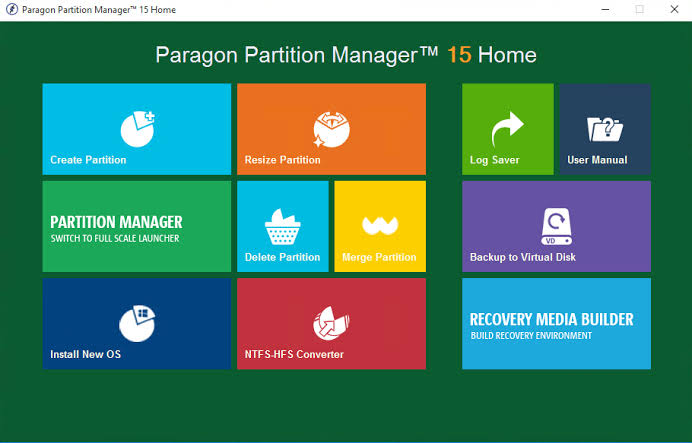
Paragon Partition Manager Free Edition (64-bit) is a free, user-friendly utility that allows you to manage the partitions on your hard drives. It provides an alternative to Windows’ built-in Disk Management tool. The software is designed to make complex disk tasks like resizing, formatting, merging, and moving partitions accessible to a wider audience.
The free edition aims to strike a balance between providing powerful features for everyday use while keeping the interface clear and guided. It supports a wide range of Windows operating systems and is particularly noted for its cross-platform file system flexibility, including support for NTFS, FAT32, and HFS+.
Key Features and Functionality
Guided Partition Wizards
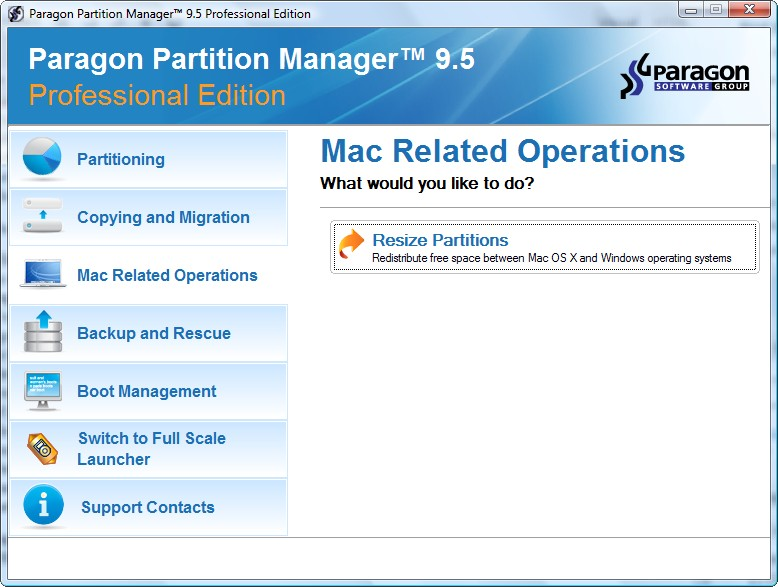
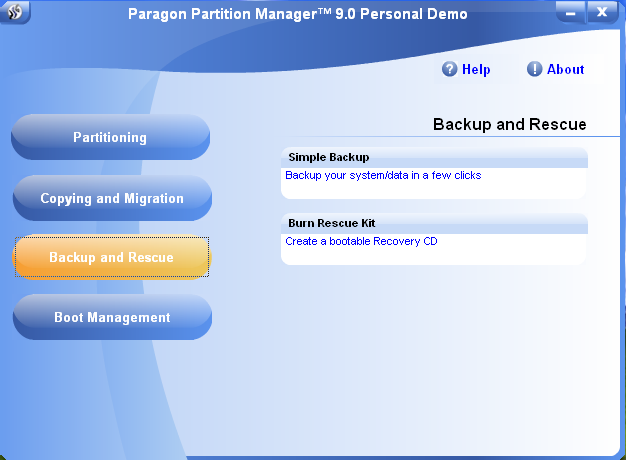
One of the software’s strongest features is its use of guided wizards for common tasks. Instead of forcing you to navigate complex menus, the program walks you through operations like creating, resizing, deleting, and merging partitions . This makes it much more accessible for users who may not be familiar with disk management terminology.
The built-in Automated partitioning presets go a step further, choosing optimal file-system settings and alignments for you . This reduces the risk of error and saves you time.
Disk Cloning and OS Migration
For users upgrading to a new, faster SSD, the integrated disk cloning wizard is a standout feature. It copies partitions sector-by-sector and can automatically resize them to match the new drive’s capacity. Crucially, it updates the bootloader, ensuring the new system starts without licensing headaches. This makes the process of migrating to a new drive significantly less intimidating.
Cross-Platform File-System Support
A feature rarely found in free partition tools is the ability to work with multiple file systems. Paragon Partition Manager can handle NTFS, FAT32, and even HFS+, the file system used by macOS. This is particularly useful for dual-boot setups, allowing you to manage partitions for both Windows and macOS.
Performance and Reliability
User reviews highlight the software’s performance, noting that it runs fast even on older SATA drives and keeps CPU usage low during operations . The program also includes a quick disk scanning feature to spot unused blocks, adding a layer of safety to your changes.
User Reviews: The Good and The Bad
What Users Like
- Ease of Use: Many users praise the “user-friendly simple user interface” and the fact that it’s easy to use, even for complex tasks like resizing a Bootcamp partition on a Mac.
- Functionality in the Free Version: Users appreciate that the free version includes essential tools like merging, formatting, and playing around with partitions. Some consider it better than other free alternatives like EaseUS Partition Master.
- Fast and Reliable: The program is often described as fast, with a small memory footprint.
What Users Dislike
- Misleading “Free” Functionality: A significant complaint is that some advanced features, specifically the disk cloning function, are locked in the free version and require a premium upgrade. One user went so far as to call it “essentially bloatware” because of this.
- Crashing and Data Loss: Some users report serious technical issues, including crashes during install and, in one case, data loss when trying to resize a partition.
- Customer Service and Activation: One user had a poor experience with the company’s customer service and its e-commerce partner, Digital River.
Pros and Cons
Pros
- Guided Wizards: Simplifies complex tasks like resizing and conversion.
- Cross-Platform File-System Flexibility: Works with Windows, macOS, and Linux file systems.
- Runs Fast Even on Older Hardware: Performs well on aging systems.
- New Features: The latest version includes undelete, merge, move, resize, and a hex editor.
Cons
- Advanced Partition Choices Locked Behind Premium Upgrade: Key features like cloning are not free.
- Documentation Overwhelms Less Experienced Users: The manual is dense and complex.
- Limited Scripting and Command-Line Control: Not ideal for advanced users who want automation.
Frequently Asked Questions (FAQs)
1. Is Paragon Partition Manager Free Edition really free?
Yes, the software is free to download and use for basic partition management tasks like resizing, creating, and formatting partitions. However, some advanced features, like disk cloning, are locked and require a paid upgrade.
2. Can I clone my hard drive with the free edition?
No, the disk cloning wizard is a premium feature. The free version will allow you to see the option, but it will be locked, prompting you to purchase the full version.
3. Does it work with macOS file systems?
Yes, one of the key features of Paragon Partition Manager is its support for HFS+, the file system used by macOS. This makes it a useful tool for dual-boot Mac/Windows systems.
4. Is Paragon Partition Manager safe to use?
While the software is from a reputable company, any disk management tool carries a risk of data loss if used incorrectly. It is always strongly recommended to back up your data before making any partition changes.
5. How does it compare to the built-in Windows Disk Management tool?
Paragon Partition Manager offers significantly more features than Windows’ built-in tool. It can resize partitions without data loss, merge partitions, convert file systems, and clone drives—tasks that are either impossible or risky with Windows’ default tools.
Conclusion: A Powerful Tool with a Catch
Paragon Partition Manager Free Edition is a powerful and user-friendly disk management utility that offers a clear upgrade over Windows’ built-in tools. Its guided wizards and cross-platform support make it accessible to a wide range of users. However, the fact that some of its most compelling features, like disk cloning, are locked behind a paywall is a significant drawback for users seeking a completely free solution. For basic partition resizing and management, it is an excellent choice. For more advanced tasks, you will need to either purchase the software or explore other free alternatives.