Razer Synapse 4 Review- Razer’s Peripheral Control Software
Read our comprehensive review of Razer Synapse 4. Discover its features for customizing Razer peripherals, including macros, lighting, and advanced gaming controls.
Introduction: The Command Center for Your Razer Gear
Razer is a name synonymous with high-performance gaming peripherals. However, even the best hardware is only as good as the software that controls it. Razer Synapse 4 is the company’s latest iteration of its unified configuration platform, acting as the command center for all your Razer devices. This review explores what Razer Synapse 4 offers, from its rebuilt architecture and user interface to its advanced gaming features and overall value for Razer users.
What is Razer Synapse 4?
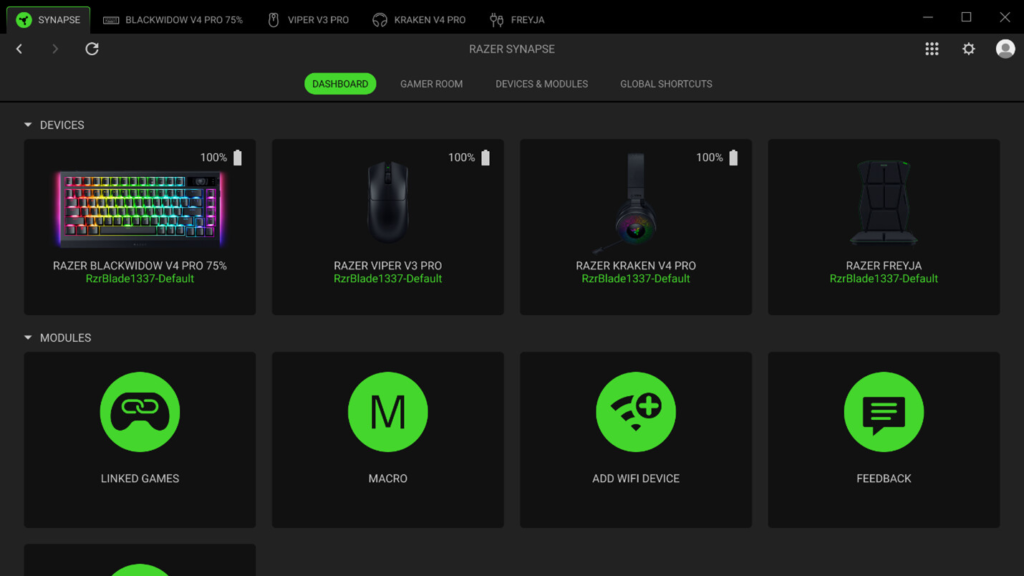
Razer Synapse 4 is a free, unified configuration tool designed to manage all connected Razer peripherals from a single interface. It serves as the central hub for customizing everything from RGB lighting and button assignments to macro creation and sensor performance.
The software treats each connected device independently, allowing you to customize them on a per-device basis. This ensures that settings for your mouse, keyboard, headset, and other Razer gear are easily accessible and don’t interfere with one another. It is built on a completely rebuilt multi-threaded software architecture, promising improved stability and performance.
Key Features of Razer Synapse 4
Rebuilt Architecture and User Interface
Razer Synapse 4 features a completely overhauled architecture, designed to be more efficient and responsive. The updated interface is cleaner and more intuitive, with a focus on modularity.
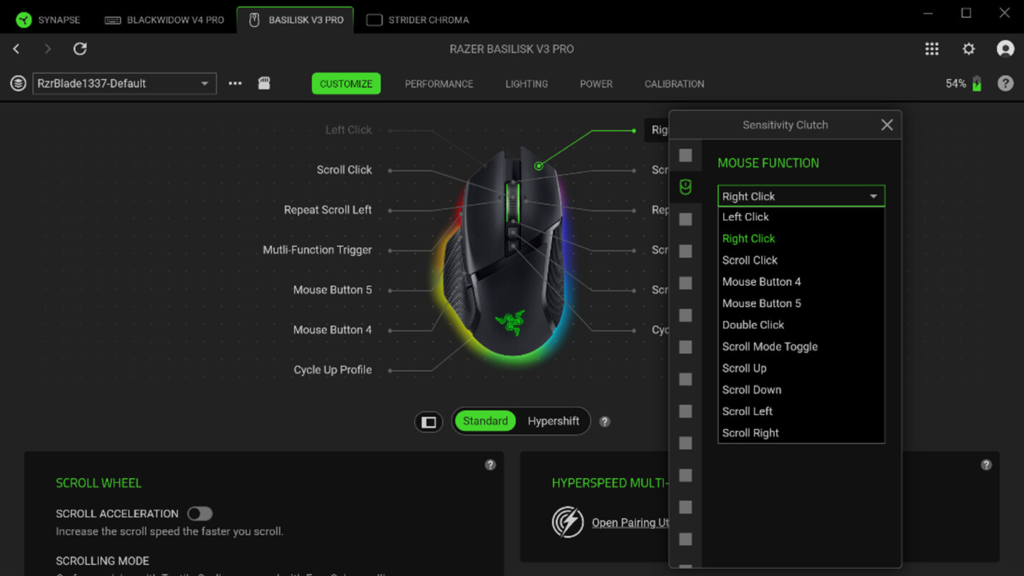
- Independent Device Tabs: Each connected device is displayed in its own separate tab. This allows you to focus on a single piece of hardware without being overwhelmed by settings for other devices.
- Floating Panels and Categorized Controls: The dashboard is reorganized into floating panels and categorized controls, making it easier to find specific settings.
- Firmware Modules: Firmware-related modules load independently, so updating a device doesn’t trigger a system-wide refresh, minimizing interruptions.
- Tooltip Overlays: Detailed parameter descriptions appear directly within adjustment menus, reducing the need for external documentation.
Razer Workshop Integration
One of the most powerful new features is the direct integration of Razer Workshop.
- Community Profiles: You can now browse, download, and apply community-created configurations directly from within the software, eliminating the need for external file imports.
- Share Your Creations: You can also upload your own custom profiles to share with the community.
Advanced Keyboard Controls
For Razer keyboards, Synapse 4 introduces several advanced gaming-focused features.
- Snap Tap: This feature prioritizes the latest registered directional input between paired keys. It allows for quicker, more precise movement in games where rapid strafing or directional changes are crucial, without requiring a full key reset.
- Rapid Trigger: This technology changes reset behavior based on the upward key travel distance rather than a fixed actuation point. This can lead to faster repeated inputs.
- Layered Remapping: Offers deep customization for key assignments.
- Onboard Profile Assignment: Store your profiles directly on the keyboard’s onboard memory.
- Per-Key Lighting Management: Customize the RGB lighting for each individual key.
Enhanced Mouse Controls
Synapse 4 also brings significant improvements to mouse customization.
- Single-Step DPI Adjustment: Instead of being locked to fixed DPI intervals, you can now shift sensitivity settings incrementally by a single DPI unit at a time. This allows for incredibly fine-tuned sensitivity adjustments.
- Sensitivity Matcher: This calibration tool records comparative sensor movement, allowing you to recreate equivalent tracking behavior across different Razer mice, ensuring a consistent feel when switching devices.
- Expanded Sensor Tuning: Access more granular control over your mouse’s sensor behavior.
Pros and Cons
Pros
- Independent Device Handling: Allows for focused, per-device customization.
- Integrated Workshop Profile Hub: Easy access to community-created configurations.
- Single-Step DPI Adjustment: Unprecedented control over mouse sensitivity.
- Analog Keyboard Trigger Settings: Advanced features like Snap Tap and Rapid Trigger for competitive gamers.
Cons
- Hardware-Dependent Features: Many of the advanced features are restricted to newer Razer hardware. Older devices may not support all the new functionality.
- Tools Unavailable on Unsupported Devices: The software itself is free, but you need the right hardware to unlock its full potential.
Who Is Razer Synapse 4 For?
Razer Synapse 4 is essential for anyone who owns current Razer peripherals.
Competitive Gamers
The advanced keyboard features like Snap Tap and Rapid Trigger, along with the precision mouse tuning, are designed to give competitive players an edge.
Razer Enthusiasts
For users with multiple Razer devices, Synapse 4 provides a unified and efficient platform for managing them all.
Customization Lovers
If you enjoy fine-tuning every aspect of your gear, the workshop integration and granular controls offer endless possibilities.
Frequently Asked Questions (FAQs)
1. Is Razer Synapse 4 free to use?
Yes, Razer Synapse 4 is completely free to download and use for all Razer users.
2. Does Razer Synapse 4 work with all Razer products?
While it supports a wide range of Razer peripherals, many of its most advanced features (like Snap Tap and Sensitivity Matcher) are only available on newer hardware. Compatibility is device-dependent.
3. What is the Razer Workshop?
Razer Workshop is a community-driven hub integrated into the software where users can download and upload custom configurations for their Razer devices.
4. What is the difference between Razer Synapse 4 and its predecessor?
Razer Synapse 4 is a complete rebuild of the software, featuring a new multi-threaded architecture for improved performance, a redesigned user interface, and the addition of advanced features like Snap Tap and Rapid Trigger.
5. Can I use Razer Synapse 4 without an internet connection?
The software requires an internet connection for initial setup and downloading profiles or updates. However, once your settings are saved to your device’s onboard memory, they will work offline.
Conclusion: A Powerful Evolution for Razer Users
Razer Synapse 4 represents a significant leap forward for the company’s software ecosystem. Its rebuilt architecture, modernized user interface, and integration of advanced features like Snap Tap and single-step DPI adjustment make it an incredibly powerful tool for customizing and optimizing Razer peripherals. The direct access to community profiles through the Razer Workshop adds a new dimension to the experience. While the hardware-dependent nature of some features may be a limitation for users with older devices, for those with current Razer gear, Synapse 4 is an essential and powerful companion.