HxD Hex Editor Review- The Go-To Tool for Binary Data Editing
Read our comprehensive review of HxD Hex Editor. Discover its features for large files, raw disk editing, and memory access. A free, powerful tool for professionals.
Introduction: A Deep Dive into the Bits and Bytes
In the world of software development, data recovery, and digital forensics, there comes a time when you need to look beyond the surface. Standard text editors can’t handle raw machine code, executable files, or the intricate structure of a hard drive’s master boot record. This is where a hex editor is essential. HxD Hex Editor is a powerful, free, and widely trusted tool that allows professionals to perform low-level editing on files, memory, and disks. This review explores its key features, what makes it a staple for technical users, and why it’s been downloaded over 4 million times.
What is HxD Hex Editor?
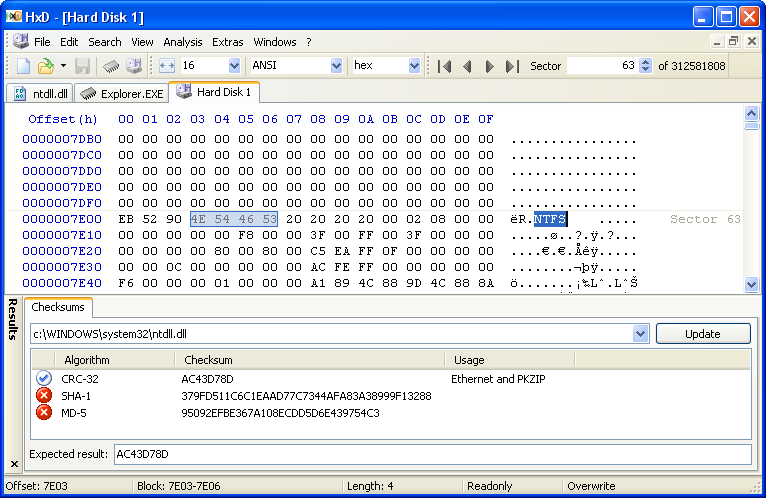
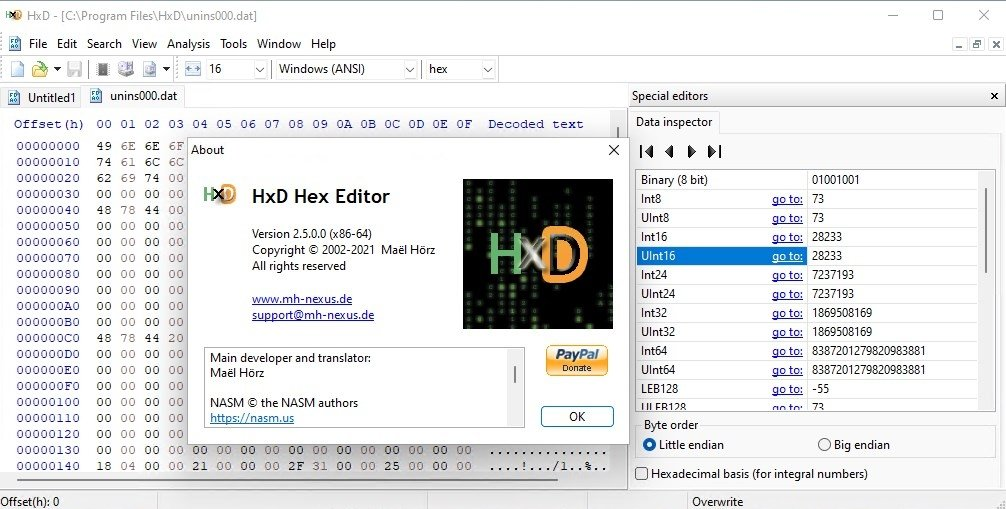
HxD Hex Editor is a free Windows application designed for viewing and editing files at the hexadecimal (hex) level . It presents the raw binary data of a file in a structured layout, showing both the hexadecimal values and their ASCII text representation. This allows you to inspect and modify data that is otherwise hidden or unreadable by standard software.
Its core audience includes software developers, IT professionals, forensic analysts, and data recovery specialists who need precise control over data. Unlike some premium alternatives, HxD is completely free to use, offering a full suite of professional-grade features without the price tag.
Key Features and Capabilities
1. High-Performance File and Data Handling
HxD is designed for efficiency and speed, capable of handling files of any size.
- Massive File Support: The editor can open and edit extremely large files quickly . It uses partial-loading mechanisms, allowing you to jump to any part of a file instantly without waiting for the whole thing to load .
- Raw Disk Editing: This is a powerful feature that allows you to open and edit the physical structure of a hard drive or SSD. This capability is crucial for advanced tasks like recovering corrupted partition tables, fixing boot sectors, or performing forensic analysis .
- Main Memory Editing: HxD can also access and edit the main memory (RAM) of running processes, which is a specialized feature used for debugging, analyzing running software, or memory forensics .
2. Powerful Search and Analysis Tools
Data is easy to find and verify.
- Flexible Search & Replace: You can search for data in multiple formats, including hexadecimal, text, and floating-point values. The replace function is equally versatile, allowing for precise edits .
- Checksums & Hashing: The software includes robust tools for calculating various checksums and hashes, such as CRC-32, MD5, and SHA-1. This is essential for verifying file integrity and ensuring data hasn’t been corrupted or tampered with .
- Data Inspector: This tool allows you to interpret raw bytes in different ways, such as viewing them as integers, floating-point numbers, or other data types, making it easier to understand structured data .
3. User-Centric Design and Usability
Despite its complex nature, HxD is praised for its clean and intuitive interface.
- Tabbed Interface: Similar to a modern web browser, it allows you to work on multiple files simultaneously in separate tabs .
- Intuitive Interface: The layout is straightforward, making it accessible even to users who are new to hex editing . The clean design minimizes the learning curve while retaining deep functionality .
- Portable Edition: The latest version includes a portable edition that can be run without installation, making it a convenient tool to carry on a USB drive .
What Users Are Saying: Pros and Cons
Strengths
- Free: A major advantage over premium rivals like 010 Editor or WinHex is that HxD is completely free, without ads or hidden costs .
- Lightning Fast & Lightweight: Users consistently praise its speed and minimal system resource usage, making it a reliable tool even on older hardware .
- Reliability and Stability: It handles demanding tasks smoothly, including complex disk and memory edits, without crashing .
- Automatic Backups: A thoughtful feature that automatically creates a backup of the original file before any modification is made, providing a critical safety net .
Potential Drawbacks
- Minimal Scripting Support: It lacks the advanced scripting features found in premium editors, which can automate repetitive tasks .
- Caution Required: Editing raw disk sectors or memory is a powerful but dangerous capability. A mistake can cause system instability or data loss, as highlighted in the review .
- Limited Guidance: The lack of built-in help files makes it a tougher learning curve for beginners who are entirely new to hex editing .
Who Should Use HxD Hex Editor?
HxD is an ideal tool for a specific set of users:
- Software Developers: For examining compiled code, editing binary files, or troubleshooting application data .
- IT Professionals: For system administration tasks like analyzing log files, repairing corrupted files, and forensic data recovery .
- Digital Forensics Analysts: For examining raw data from storage devices, recovering deleted information, and analyzing file structures .
- Advanced PC Users: For those who want to explore what’s inside a file or troubleshoot complex system-level issues .
Frequently Asked Questions (FAQs)
1. Is HxD Hex Editor free to use?
Yes, HxD is entirely free to download and use. It is ad-free and offers a full suite of professional features without any cost.
2. What is the primary use of a hex editor like HxD?
A hex editor is used to view and edit the raw binary data (machine code) of a file. This is necessary for tasks like data recovery, binary file analysis, editing executable files, and forensic investigations where standard text editors are insufficient.
3. Can HxD edit files that are extremely large?
Yes, HxD is designed to handle files of any size. It uses a partial-loading technique, meaning you can open and edit a 100 GB file instantly, as it only loads the portions you are viewing.
4. Is it safe to use HxD for disk editing?
Editing raw disk sectors is a powerful feature but should be used with extreme caution. Incorrect edits can corrupt your system. HxD is a stable tool, but the user must be knowledgeable to avoid mistakes, as the editor does not prevent harmful changes.
5. Does HxD support checksums and hashing?
Yes, HxD has built-in tools to calculate standard checksums and hashes, including CRC-32, MD5, and SHA-1. This is useful for verifying the integrity of files.
Conclusion: A Dependable Workhorse for Data Editing
HxD Hex Editor has earned its reputation as a trusted and essential tool for professionals who need to work at the data-level. Its ability to handle massive files, edit raw disks and memory, and perform complex searches efficiently makes it a powerhouse. The fact that it is free and lightweight is a significant bonus. While it lacks some of the advanced scripting and visual flair of its premium competitors, its focus on speed, precision, and stability makes it the ideal choice for any user who requires a powerful, no-nonsense hex editor. For anyone who needs to delve into the binary world, HxD is a practical, highly effective, and reliable solution.