Windows Media Player (64-bit) Review- A Classic Media Player in 2026
Read our review of Windows Media Player (64-bit). Learn about its features, library management, CD/DVD support, and how it compares to modern players.
Introduction: The Legacy of Windows Media Player
For many PC users, the name “Windows Media Player” (WMP) evokes a sense of nostalgia. It was the default application for music and video on Windows for years, a familiar and trusted companion for millions. While Microsoft has since shifted focus to newer apps like “Movies & TV” and “Groove Music,” Windows Media Player remains a part of the Windows ecosystem, particularly for those who prefer its classic, no-fuss interface. This review examines the 64-bit version of this enduring media player, exploring its features, its strengths, and its limitations in the modern media landscape.

What is Windows Media Player (64-bit)?
Windows Media Player (64-bit) is Microsoft’s long-standing media software designed to provide smooth audio and video playback on 64-bit versions of Windows. For years, it was the go-to application for managing and playing personal media collections, earning a reputation for its stability, simplicity, and seamless integration with the operating system.
This version is optimized to handle larger media libraries and demanding playback tasks, making it a solid choice for users with extensive collections of music, videos, and photos stored locally on their PCs.
Key Features of Windows Media Player
Wide Format Support
One of the primary strengths of WMP is its support for a broad range of popular file formats. It can handle:
- Audio: MP3, WMA, WAV
- Video: MP4, AVI, WMV
This wide compatibility ensures that you can play most standard media files without needing to download additional codecs. However, it is important to note that some users find the built-in codec support restrictive, as it may not play certain modern or less common formats.
Media Library Management
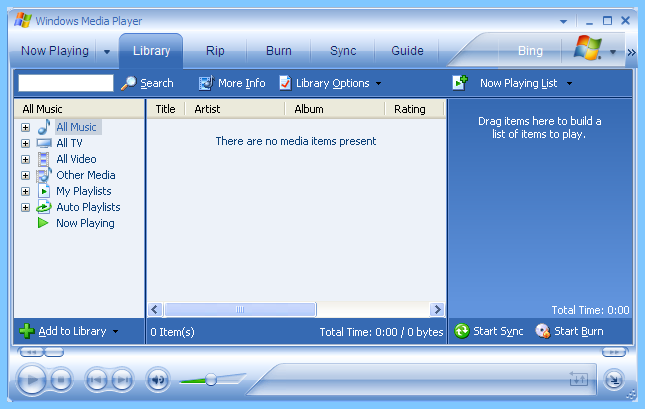
This is where WMP truly shines. The software excels at organizing your media files.
- Automatic Detection: It automatically detects media files on your system and organizes them by artist, album, and genre.
- Customizable Playlists: You can create and customize playlists to perfectly suit your mood or preferences.
- Easy Navigation: The library is presented in a clean, easy-to-navigate interface.
CD Ripping and Burning
A feature that many still find invaluable is WMP’s support for physical media.
- CD Ripping: You can rip (copy) music from audio CDs to your computer’s digital library.
- CD/DVD Burning: You can also burn your digital music and video files to CDs or DVDs, making it easy to create physical backups or mix CDs.
Customization Options
Despite its classic interface, WMP offers a surprising amount of personalization.
- Skins: You can change the look of the player by applying different skins.
- Visualizations: The player comes with a variety of audio visualizations that react to your music in real time.
- Playback Settings: You can adjust equalizer settings and other playback options.
Performance and Reliability
Smooth Playback
The software provides reliable playback, and the 64-bit version is specifically designed to handle larger media libraries and demanding video files with improved stability and performance.
Seamless Windows Integration
Being a Microsoft product, it integrates well with the operating system, ensuring smooth performance and compatibility with other Windows features.
The Key Limitations
An Outdated Interface
The most common criticism of WMP is its interface. While clean and functional, it has not seen a significant visual update in years. In comparison to modern, sleek media players, it looks dated.
Limited Codec Support
While it supports many popular formats, the default codec support is limited. This means you may need to download additional codec packs to play certain file types, which is something modern players often handle natively.
Missing Modern Features
The player is showing its age in its feature set. It lacks:
- Streaming Service Integration: It does not support built-in integration with platforms like Spotify or Netflix.
- Advanced Codec Support: It struggles with some newer, more advanced video and audio formats.
- Extensive Subtitle Options: Subtitle support is basic and not as robust as dedicated media players.
- Cloud Sync: It does not seamlessly sync your library across devices like some modern apps.
Windows Media Player vs. Modern Alternatives
To understand its place today, it’s helpful to compare it to modern alternatives.
| Feature | Windows Media Player | Modern Alternatives (e.g., VLC, Spotify, WMP’s successors) |
|---|---|---|
| Interface | Clean but dated | Sleek, modern, and visually updated |
| Codec Support | Good, but not extensive | Excellent, plays almost any file (VLC) |
| Streaming Integration | Not available | Built-in (Spotify) |
| Library Management | Strong for local files | Can manage local and cloud files |
| CD/DVD Functions | Yes | Often not a focus |
| Platform Integration | Deep Windows integration | Varies |
Who Is Windows Media Player (64-bit) For?
The Nostalgic User
If you have been using Windows for years and prefer the familiar, straightforward interface, WMP remains a comfortable and reliable choice.
The User with a Large Local Media Library
Its strong library management and optimization for 64-bit systems make it an excellent tool for organizing and playing large collections of music, photos, and videos stored directly on your computer.
The Physical Media User
If you still frequently rip or burn CDs and DVDs, WMP’s built-in features are practical and easy to use.
Frequently Asked Questions (FAQs)
1. What is the difference between the 32-bit and 64-bit version of Windows Media Player?
The 64-bit version is optimized for 64-bit versions of Windows. It can handle larger media files and libraries more efficiently and offers improved stability.
2. Why won’t Windows Media Player play some video files?
This usually happens because the player lacks the necessary codec to decode the file. You can often resolve this by downloading and installing a popular codec pack.
3. Does Windows Media Player still get updates?
While it receives security and stability updates, it is no longer a major focus for Microsoft. The company has shifted its attention to other media apps like “Movies & TV” and “Groove Music.”
4. Can I use Windows Media Player to stream to other devices?
Yes, older versions (specifically Windows Media Player 11) introduced a Media Sharing feature that allowed you to stream your library to other devices on your home network.
5. Is Windows Media Player the best option for a modern media player?
That depends on your needs. It’s a reliable choice for basic, local file playback. However, if you want a player with a modern interface, extensive codec support, or streaming service integration, a third-party app like VLC Media Player is a better choice.
Conclusion: A Dependable Classic
Windows Media Player (64-bit) remains a dependable and stable media player for basic playback and library management. Its strengths lie in its simplicity, its solid performance with local media, and its practical CD/DVD tools. However, in a world of sleek streaming services and powerful third-party players, WMP is beginning to show its age. It is a classic that still serves a purpose for those who value straightforward functionality, but it is no longer the cutting-edge application it once was.