AVG AntiVirus Free Review- Is It Still Worth Using in 2026?
Read our comprehensive review of AVG AntiVirus Free. Learn about its features, performance impact, and why user reviews are mixed. Is it the right free antivirus for you?
Introduction: A Familiar Name in Free Security
AVG AntiVirus Free has been a household name in PC security for decades. For many users, it was the first line of defense against online threats, offering essential protection without the price tag of premium suites. However, the world of free antivirus has changed, and so has AVG. This review provides an objective look at the software’s current state, analyzing its features, performance, and the significant criticisms it faces from users today.
What is AVG AntiVirus Free?
AVG AntiVirus Free is a free security utility designed to protect Windows PCs from a wide range of malware, viruses, spyware, and other online threats. Backed by years of industry experience and a large user base, it aims to provide robust, real-time protection that works quietly in the background.
The software leverages one of the world’s largest virus databases, combined with advanced artificial intelligence, to identify and neutralize both known and emerging (zero-day) threats. It is particularly known for its multi-layered protection that uses powerful shields to stop malicious software from ever reaching your system.
Core Features and Protective Layers
The primary appeal of AVG AntiVirus Free is its multi-layered defense system, which offers several key protective features designed to secure your computer and online activities.
Real-Time Malware Protection
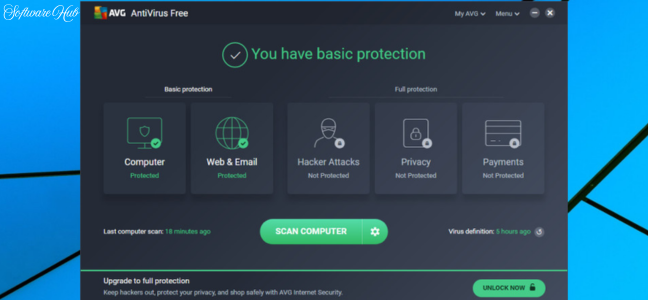
At the heart of the software is its real-time protection engine. It continuously monitors your system for suspicious activity, employing six powerful layers to block viruses, spyware, ransomware, rootkits, Trojans, and other forms of malware. This protection works in the background, actively scanning files and processes as you use your computer.
Web and Email Shields
AVG also extends its protection to your online communications:
- Email Shield: This feature scans incoming and outgoing emails for dangerous attachments and suspicious phishing links, adding a layer of security to your digital correspondence.
- Phishing Protection: It actively detects and blocks unsafe websites and scam pages. This is crucial as phishing attacks attempt to trick you into revealing personal and financial information on fake sites.
Automatic Updates
Another significant advantage is the automated update system. AVG pushes security updates and new features automatically, ensuring that your protection against the latest threats is always up to date without requiring you to lift a finger.
The User Experience: Simplicity and Its Downsides
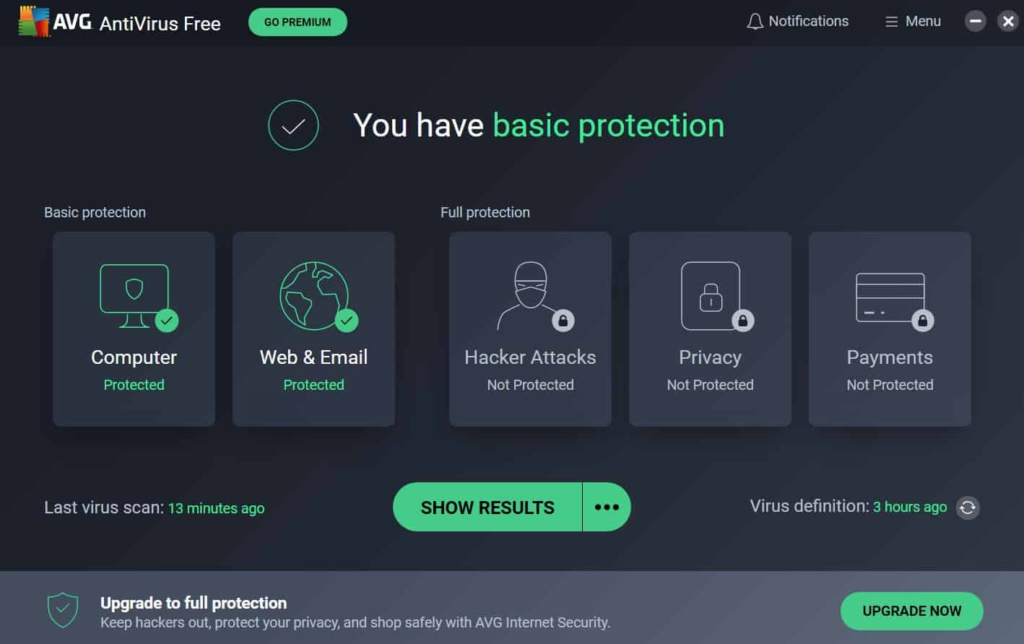
The software is designed with a clean and user-friendly interface. The layout is straightforward, making it easy to initiate scans, manage settings, and understand your system’s security status even if you are not a tech expert.
However, this simplified experience has a significant downside: frequent pop-up notifications and advertisements. Many users report that the free version aggressively pushes upgrades to paid features, such as enhanced firewalls or VPN services. These persistent ads can be disruptive and frustrating, detracting from the overall user experience.
Performance and System Impact
One of the most common user complaints is the software’s impact on system performance. While AVG claims its software won’t slow you down, many users report the opposite:
- Resource Usage During Scans: Several users have reported that the software can be resource-intensive, particularly during deep scans. This can lead to noticeable slowdowns in system performance, making it difficult to use your PC for other tasks while a scan is running.
- Background Activity: Some users have noted that the application can consume a significant portion of CPU cycles and memory even when idle, affecting overall system responsiveness.
The Removal Nightmare: A Major Red Flag
Perhaps the most concerning issue raised by users is the difficulty of uninstalling the software. Multiple reviews highlight that AVG AntiVirus Free can be extremely difficult to remove completely. Some users report that the program:
- Refuses to Uninstall: The software may not appear in the regular uninstall list, or the uninstall process may fail.
- Leaves Behind Residuals: Even after using AVG’s own removal tool, traces of the program can remain in the system, including registry entries.
- Requires Multiple Attempts: Users have had to run their uninstaller multiple times or resort to third-party tools to get rid of all components.
This behavior is a major red flag. A security application that is hard to remove can feel more like a virus itself, raising serious concerns about trust and integrity.
User Reviews: A Story of Decline
A deep dive into user reviews on CNET reveals a clear narrative: the software has significantly declined in user satisfaction. While many users acknowledge that AVG is still a “good antivirus,” the overwhelming sentiment is negative, focusing on intrusive behavior.
| Positive Feedback | Negative Feedback |
|---|---|
| Good at blocking viruses and malware. | Can consume significant system resources (CPU, memory). |
| Free to use. | Intrusive pop-ups and nag screens to upgrade. |
| Offers decent protection. | Very difficult, if not impossible, to fully uninstall. |
| The free version now feels more like adware. | |
| Added unwanted email signatures by the software. | |
| Poor and unhelpful customer support for free users. | |
| Can cause conflicts with other software like web browsers. |
Summary of Key Complaints:
- Resource Hog: Users report up to 24% CPU usage on i5 processors and high memory consumption.
- Nagging Pop-ups: The software is considered “worse than what I am trying to prevent.”
- Uninstall Issues: The software is described as “malware” or “a virus itself” because of its refusal to be removed.
- Email Tampering: One user reported that AVG added a “virus-free-www.avg.com” signature to all outgoing emails without consent.
- Poor Support: Free users often receive dismissive responses when seeking help.
Who Is AVG AntiVirus Free For?
While its popularity has waned, the software may still be a consideration for some users:
The Nostalgic User
For those who have used AVG for years without encountering major issues and are willing to tolerate the pop-ups and potential performance hits, it may still serve as a familiar fallback.
The Brand-New User
A user who is completely new to PC security might find the easy-to-navigate interface and foundational protection sufficient, at least until they experience the downsides for themselves.
Top Alternatives to Consider
Given the negative user feedback, there are several alternatives that are widely considered better choices in 2026:
Microsoft Defender (Built-in)
For most users, the built-in Windows security solution is a strong, lightweight, and completely free option that integrates seamlessly with the OS without performance hits or pop-ups.
Bitdefender Antivirus Free
Bitdefender is often praised as a top-tier free antivirus that offers excellent protection with minimal system impact and far fewer intrusive ads.
Avast Free Antivirus
While Avast is also known for pop-ups, many users report a smoother experience compared to AVG.
Frequently Asked Questions (FAQs)
1. Is AVG AntiVirus Free really free?
Yes, it is free to download and use. However, it relies on pop-up notifications to upsell its paid “Pro” features, which can be intrusive.
2. Does AVG AntiVirus Free slow down my computer?
Many users report that it can be a resource hog. It may cause high CPU usage and slowdowns, especially during active scans or on older hardware.
3. Why is AVG AntiVirus Free so hard to uninstall?
This is a common and serious complaint. Many users find it very difficult to fully remove the software. Even with the official removal tool, residual files and registry entries may remain. It often requires multiple attempts or third-party uninstallers.
4. What is the difference between AVG Free and AVG Pro?
The free version offers core protection but includes ads and pop-ups. The Pro version includes additional security features like an advanced firewall and VPN and removes the advertisements.
5. What are some better alternatives to AVG AntiVirus Free?
Strong alternatives include the built-in Microsoft Defender, Bitdefender Antivirus Free, and Avast Free Antivirus. Many users find these are less intrusive and offer better performance.
Conclusion: A Cautionary Tale
AVG AntiVirus Free offers solid and effective foundational protection against malware and online scams, backed by an intuitive interface. However, this is overshadowed by significant and well-documented drawbacks. The software’s user satisfaction has plummeted due to its intrusive pop-ups, tendency to consume system resources, and reported difficulty in uninstalling it completely.
Given these major issues and the availability of superior free alternatives, AVG AntiVirus Free is hard to recommend in its current state. For most users, the built-in Microsoft Defender or a more user-friendly free option like Bitdefender will likely provide a more secure, faster, and less frustrating experience. The software serves as a cautionary example of how a once-respected product can decline when user experience is deprioritized for marketing purposes.