FastEZ CD and DVD Maker- A Simple Disc-Creation Tool
There was a time not long ago when burning a CD or DVD was a routine computer task. You wanted to share photos with grandparents? Burn a disc. You needed to back up important documents? Burn a disc. You created a mix of your favorite songs for a road trip? Definitely burn a disc.
While USB drives, cloud storage, and streaming have largely replaced optical media, there are still situations where a physical disc is useful. Archival backups, gifts for less-technical family members, car stereos without Bluetooth, or simply the satisfaction of creating something tangible.
FastEZ CD and DVD Maker is a Windows software application designed to make disc burning straightforward. As the name suggests, it aims to be “fast” and “easy,” guiding users through the process of creating playable CDs and DVDs with custom menus, slideshows, and file backups.
Published on CNET Download on February 26, 2026, FastEZ CD and DVD Maker (version 2.1.0.101) has accumulated over 62,000 total downloads, making it one of the more popular tools in this article series. However, user reviews are mixed, with complaints about crashes and installation issues alongside praise for simplicity. This article provides a complete overview of the software.
FastEZ CD and DVD Maker – Complete Guide to This Disc Burning Tool
What Is FastEZ CD and DVD Maker?
FastEZ CD and DVD Maker is a free Windows utility for creating data, audio, and video discs. It allows users to burn photos, music, and video files to CD or DVD formats that can be played in standard home DVD players, car stereos, and computers.
The Core Purpose:
Unlike simple file-burning tools that just copy data to a disc, FastEZ aims to create playable media. That means:
- Photo DVDs: A disc of images that displays as a slideshow on a TV when inserted into a DVD player.
- Music CDs: Standard audio CDs playable in any CD player (not just computers).
- Video DVDs: MPEG-2 formatted discs that work in home DVD players.
- Data backups: Copies of original source files stored on the disc for safekeeping.
Key Information from the Source:
- Version: 2.1.0.101
- Platform: Windows (98, ME, 2000, XP, 10)
- Publication Date: February 26, 2026 (likely a re-listing of older software)
- Total Downloads: 62,323
- User Rating: 2.1/5 stars (based on 7 user votes)
Key Features of FastEZ CD and DVD Maker
Based on the CNET listing and developer’s description, here are the main features.
1. Create Playable CDs and DVDs from Various Media Types
The software accepts photos, music files (MP3, WAV, etc.), and video files. It then formats them correctly for the chosen disc type. A music CD created by FastEZ will play in a car stereo, not just a computer’s DVD drive.
2. Customizable Menu Themes with Embedded Images
For DVD creation (photo or video discs), FastEZ allows users to create custom on-screen menus. These are the navigation screens that appear when a DVD is inserted into a player. You can choose from pre-designed themes and even embed your own pictures as menu backgrounds or selection buttons.
3. Includes Music for Slideshows
When creating a photo DVD, you can add background music. The slideshow of images plays on the TV while your chosen soundtrack runs in the background. This transforms a simple disc of pictures into a more engaging presentation.
4. Backup of Source Files
Original files are copied to the disc in their original format as well as being incorporated into the playable structure. This means the disc serves two purposes: playable media and data backup. If you lose the original photos on your hard drive, you can retrieve them from the disc.
5. Thumbnail Display for Easy File Location
The software displays thumbnails (small preview images) of photos and videos. This makes it easier to select which files to include on your disc, especially when working with large collections.
6. Previews Disc Creations Before Burning
Before committing to the burn process (which consumes a blank disc and takes time), you can preview the project. This includes checking menu navigation, slideshow timing, and music synchronization. Previewing catches errors before you waste a disc.
7. Printing Features (Limited Format Options)
FastEZ includes the ability to print labels, case inserts, or contact sheets. However, the editors’ review notes that “printing features may have limited format options.” Users seeking extensive print customization may need dedicated label-making software.
8. Digital Library Organization
The software includes a “Digital Library” feature to organize your media files within the application. The editors note that this organization “could be more robust” compared to dedicated media management tools.
9. Wizards and Entertainment Center Interface
FastEZ offers two ways to work: step-by-step wizards for beginners or an “entertainment center interface” for more experienced users. This flexibility helps accommodate different skill levels.
System Requirements and Compatibility
FastEZ CD and DVD Maker supports a wide range of Windows versions, reflecting its long history.
| Operating System | Supported |
|---|---|
| Windows 10 | Yes |
| Windows XP | Yes |
| Windows 2000 | Yes |
| Windows ME | Yes |
| Windows 98 | Yes |
No Windows 11 or Windows 7: The listing does not include Windows 7 or Windows 11. Windows 7 support is a notable omission given its popularity. Users on Windows 7 or 11 may experience compatibility issues.
Hardware Requirement: A CD or DVD burner drive is obviously required. The software cannot create discs without compatible burning hardware.
Additional Requirements: Windows 98/Me/2000/XP (specific to those older OS versions). For Windows 10, likely no additional requirements beyond the OS itself.
Popularity and User Feedback
Download Statistics:
- Total Downloads: 62,323
- Downloads Last Week: 15 (at the time of the listing)
Analysis: 62,000+ downloads is substantial for a niche disc-burning tool. This indicates FastEZ achieved real popularity, likely during the peak of optical media usage (mid-2000s to early 2010s). The low recent downloads (15/week) reflect the decline of disc burning as a common task.
User Reviews (2.1/5 stars, 7 reviews): The user feedback is sharply divided.
Negative Reviews (the majority):
- “Worse program ever… froze up my system, not user friendly.”
- “Piece of Crap… does not work. If it doesn’t crash on launch, it just does not complete without one error or another.”
- “Seems ok… but after you set up the project to burn, you click burn and BAM, IT CRASHES!” (multiple users reported this exact crash-on-burn issue)
- “A horrible lame waste of time.”
Positive Reviews:
- “Seems like a good program. real easy to use.” (complaint only about limited menu customization)
- “The newest version… is much faster, and simple to use… I had no problem at all burning several discs.”
Common Complaint Pattern: The most frequently reported issue is crashing at the burn stage. Users could load files, customize menus, preview the project—all worked fine. But when clicking the final “burn” button, the application crashed. This suggests a bug related to specific burner hardware or driver conflicts.
Positive Review Pattern: Users who did not experience crashes praised the simplicity and speed. The software appears to work reliably for some hardware configurations but not others.
How FastEZ Compares to Alternatives
In its prime, FastEZ competed with several other disc authoring tools.
| Software | Cost | Key Strength | Weakness |
|---|---|---|---|
| FastEZ CD and DVD Maker | Free | Simple interface, menu customization | Crashes reported for some users |
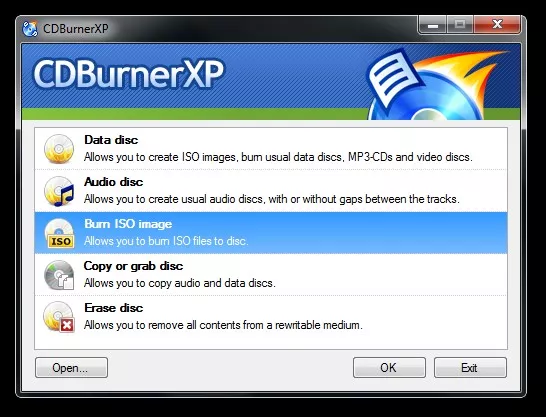
| CDBurnerXP | Free | Reliable, no crashes reported by many | No built-in DVD menu authoring |
| ImgBurn | Free | Very reliable for data burning | No menu creation, complex for beginners |
| Ashampoo Burning Studio | Paid (free version limited) | Feature-rich, stable | Paid version required for full features |
| Nero Burning ROM | Paid | Industry standard (formerly) | Expensive, bloated |
| Windows built-in burning | Free (included) | No installation needed | Very basic, no DVD menus |
Where FastEZ Shines: If you specifically need to create DVD video discs with custom menus (for TV playback), FastEZ offers that functionality for free. Windows’ built-in burner and CDBurnerXP do not.
Where FastEZ Fails: The crash reports are concerning. Before relying on FastEZ, test it with a rewritable disc (DVD-RW) to see if it works with your specific burner.
Is FastEZ CD and DVD Maker Still Relevant in 2026?
The honest answer: for most people, no. But for specific use cases, yes.
Why Disc Burning Has Declined:
| Then (2005-2010) | Now (2026) |
|---|---|
| USB drives were expensive ($20+ for 1GB) | USB drives are cheap ($10 for 64GB) |
| Cloud storage was slow and small | Google Drive, iCloud, Dropbox offer free, fast sync |
| Car stereos had CD players | Car stereos have Bluetooth, USB, or streaming |
| Laptops had optical drives | Most laptops no longer include disc drives |
| Sharing photos meant mailing discs | Sharing photos means sending a link |
When You Might Still Need Disc Burning:
- Archival backups: Burned DVDs (quality discs, stored properly) can last 10-20 years. Hard drives fail. Cloud accounts get hacked or closed. A physical disc in a safe is permanent offline storage.
- Gifts for older relatives: Grandparents may have a DVD player but not a computer or smartphone. A photo DVD they can play on their TV is still appreciated.
- Car stereos: Older vehicles (pre-2010) often have CD players but no auxiliary input or Bluetooth.
- Legal or medical requirements: Some industries still require physical media for record delivery.
- Art projects: Creating physical discs with custom labels and menus as a creative medium.
If You Need to Burn Discs in 2026:
Consider using CDBurnerXP (for data/audio) or DVDStyler (for DVD menu creation) instead of FastEZ. Both are free, open-source, and have better modern compatibility and fewer crash reports. DVDStyler, in particular, offers robust DVD menu authoring similar to FastEZ but with active development.
Tips for Using FastEZ (If You Choose To)
If you decide to try FastEZ CD and DVD Maker despite its age and mixed reviews, follow these precautions.
1. Test with Rewritable Discs First
Use a DVD-RW or CD-RW (rewritable) disc for your first test burns. If the software crashes, you have not wasted a permanent disc.
2. Run as Administrator
Right-click the FastEZ executable and select “Run as administrator.” This can prevent permission-related crashes.
3. Close Other Programs
Burning is resource-intensive. Close web browsers, antivirus scans, and other applications to minimize conflicts.
4. Update Your Burner Drivers
Visit your optical drive manufacturer’s website to ensure you have the latest drivers. Outdated drivers are a common cause of burn failures.
5. Use Verbatim or Taiyo Yuden Discs
Cheap, no-name blank discs have higher error rates. Quality media (Verbatim, Taiyo Yuden) is more forgiving.
6. Burn at Slower Speeds
Select a lower write speed (e.g., 4x or 8x for DVD, 8x or 16x for CD). Slower burns are more reliable.
7. Have an Alternative Ready
If FastEZ crashes, have CDBurnerXP or DVDStyler downloaded and ready to use as a backup.
Frequently Asked Questions (FAQs)
1. Is FastEZ CD and DVD Maker really free?
Yes, according to the CNET listing, the software is free. There is no mention of trial limitations, watermarks, or paid upgrades. However, some user reviews refer to “pay for it,” suggesting there may have been a paid version or misleading upsells in older editions. Download only from the official CNET page to avoid fake “pro” versions.
2. Why does FastEZ crash when I try to burn?
This is the most common user complaint. Crashes are likely due to driver conflicts, incompatible burner hardware, missing system updates, or the software’s age (designed for Windows XP/2000, running on Windows 10). Try running as administrator, updating your burner drivers, or using a different disc authoring tool like DVDStyler.
3. Can FastEZ create Blu-ray discs?
The specifications do not mention Blu-ray. The name says “CD and DVD Maker,” so Blu-ray is likely not supported. For Blu-ray burning, look for dedicated software like ImgBurn or commercial suites.
4. Will FastEZ work on Windows 11?
Windows 11 is not listed as a supported operating system. The software was likely developed before Windows 11 existed. It may run using compatibility mode (right-click properties > Compatibility > Windows 10 or Windows 7). However, given the crash reports on Windows 10, Windows 11 is also risky. Use a more modern tool instead.
5. Does FastEZ support DVD-R DL (dual layer) discs?
The source does not specify. Dual-layer DVDs (8.5GB capacity) require specific burner and software support. Many older disc authoring tools do not handle dual-layer reliably. Stick with single-layer DVDs (4.7GB) for best compatibility.
Conclusion
FastEZ CD and DVD Maker occupies a bittersweet place in software history. With over 62,000 total downloads, it clearly served a need for many users seeking a free, simple tool to create playable CDs and DVDs with custom menus. Its features—thumbnail browsing, slideshow music, menu customization, and disc preview—were genuinely useful when optical media was a primary distribution method.
However, the user reviews paint a troubling picture. Multiple users report the same critical flaw: the software crashes consistently at the final burn stage. When a disc authoring tool cannot reliably burn discs, its value approaches zero. The positive reviews suggest it works for some hardware configurations, but the crashes are common enough to be a pattern.
In 2026, FastEZ is best viewed as a legacy tool. For the handful of users who still need to burn discs—whether for archival backups, gifts, or vintage car stereos—more reliable free alternatives exist. CDBurnerXP handles data and audio CDs without crashes. DVDStyler offers DVD menu authoring with active development and better modern compatibility. Both are free.
If you choose to try FastEZ, test thoroughly with rewritable discs before trusting it with important data. And if it crashes (as it may), you now know where to find alternatives. FastEZ CD and DVD Maker was a good idea in its time, but time has moved on.