Python 64-Bit – Unleashing the Power of Modern Computing
Introduction
In the vast landscape of programming languages, Python has emerged as a true giant. Its elegant syntax, remarkable versatility, and the sheer breadth of its capabilities have made it the language of choice for everything from simple scripting to complex artificial intelligence applications. But as computing has evolved, so has the need for Python to harness the full power of modern hardware. This is where the 64-bit version of Python comes into play.
Python 64-bit is not merely a port of the language to a different architecture; it is a significant upgrade that unlocks the potential of contemporary processors and operating systems . It allows developers and users to handle larger datasets, build more complex applications, and fully utilize the memory resources of modern computers. This comprehensive guide will walk you through everything you need to know about Python 64-bit, from its fundamental advantages and installation process to its powerful standard library and where it fits in the programming ecosystem.
Chapter 1: Understanding Python 64-Bit – What It Is and Why It Matters
The 64-Bit Advantage
At its core, a 64-bit version of Python means the interpreter and the programs you run with it have been compiled specifically for processors that support a 64-bit instruction set . This has several key implications:
- Expanded Memory Addressing: This is the most significant advantage. A 32-bit application is limited to addressing a maximum of 4 gigabytes (GB) of RAM. In contrast, a 64-bit application can theoretically address up to 16 exabytes of memory. While no normal system has this much RAM, the practical benefit is that Python 64-bit can use all the memory available in a modern system—8GB, 16GB, or even more—without being constrained by the 4GB limit.
- Enhanced Performance for Intensive Tasks: While the speed difference isn’t always noticeable in simple scripts, 64-bit Python can show performance improvements in computationally heavy tasks. This is partly because it can process larger chunks of data at once and leverage modern processor features more effectively.
- Better Compatibility with Modern Libraries: Many powerful libraries, particularly in fields like data science and machine learning (e.g., TensorFlow, PyTorch), are optimized for 64-bit architectures. Using the 32-bit version of Python may limit your ability to use these libraries or force you to use older, less efficient versions.
- Large Memory-Mapped Files: For applications that need to work with very large files—like analyzing massive log files or processing huge datasets—the 64-bit version can memory-map these files into its address space, providing faster and more efficient access.
When to Choose Python 64-Bit
For the vast majority of modern Windows users, the 64-bit version is the recommended choice . If you have a computer purchased in the last decade with a 64-bit processor (most Intel Core, AMD Ryzen, or modern ARM chips) and at least 4GB of RAM, you should be using Python 64-bit. It ensures that your Python environment can fully utilize your hardware’s capabilities.
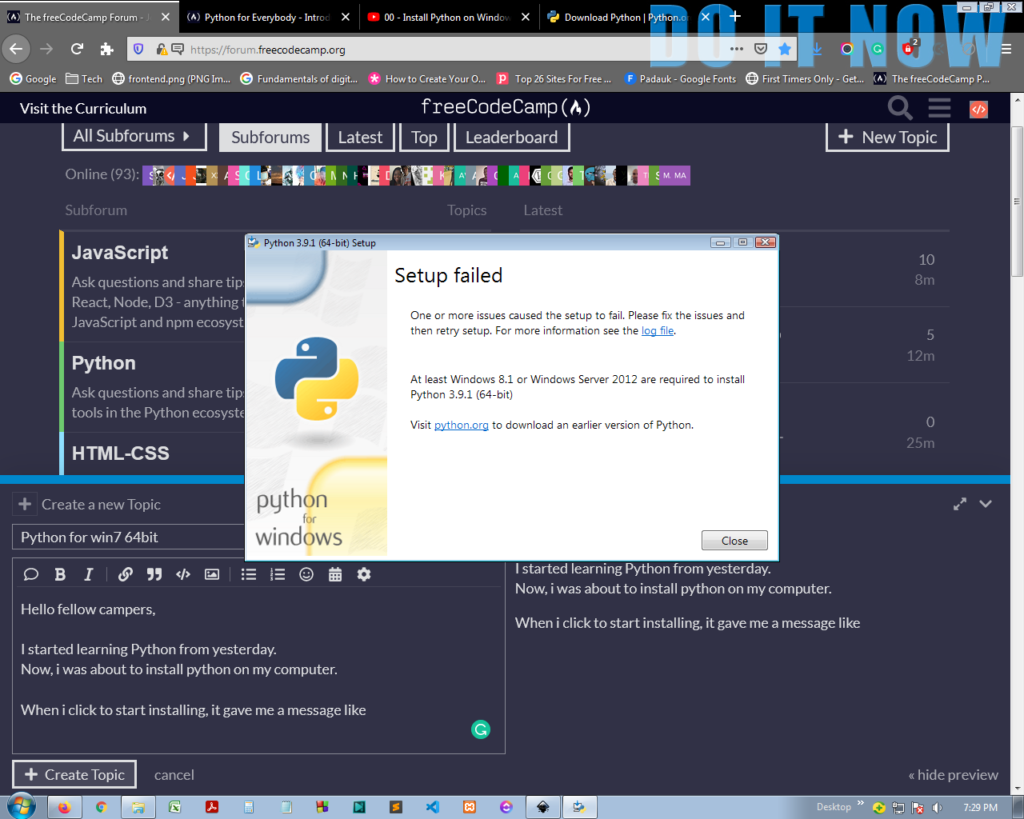
In very specific, niche scenarios, the 32-bit version might still be used. For example, if you need to integrate with very old, 32-bit-only libraries that have no 64-bit equivalent, you might be forced to use Python 32-bit. But for most developers and users, the 64-bit version is the clear and future-proof choice.
Chapter 2: Installing Python 64-Bit on Windows – A Step-by-Step Guide
Installing Python on Windows is a straightforward process, but paying attention to a few key details can save you from future headaches .
Step 1: Downloading the Installer
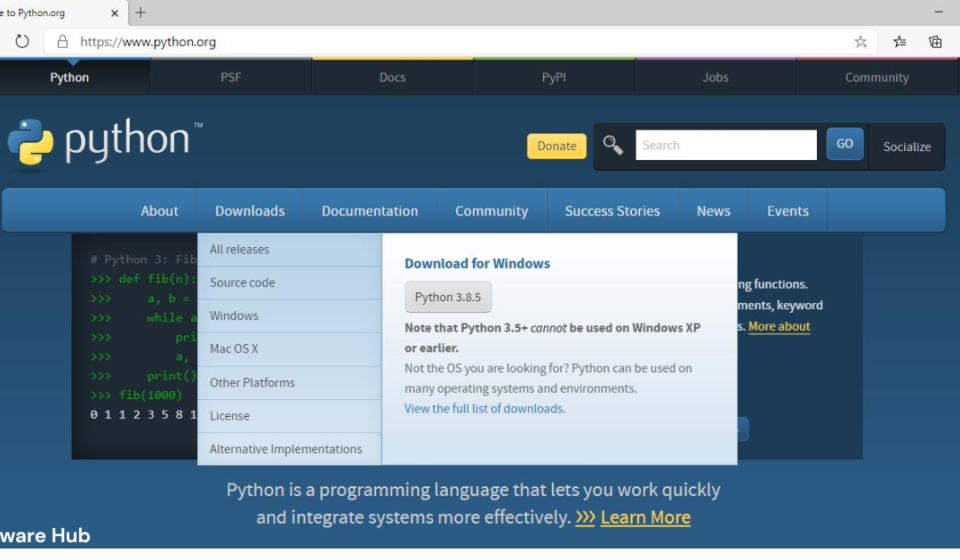
- Navigate to the official Python website at https://www.python.org/downloads/ .
- The website is smart and will typically recommend the best version for your system. Look for the big yellow download button. This will usually be for the latest stable version of Python 3. Under the button, ensure you are downloading the Windows installer (64-bit) . The file name will often include “amd64”, which is the correct version for standard Intel and AMD 64-bit processors .
Step 2: Running the Installer
- Locate the downloaded
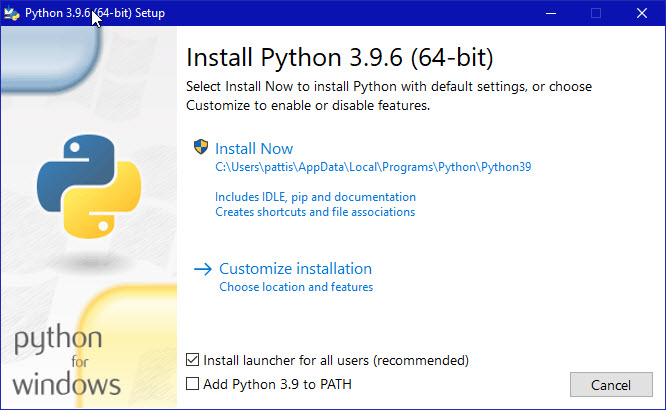
.exefile and double-click it to run the installer. - Crucial Step: At the very bottom of the first installer window, you will see two checkboxes:
- Add Python.exe to PATH: You MUST check this box. This is arguably the most important step in the entire installation . It ensures that you can run Python and its tools directly from the Command Prompt or PowerShell without having to type the full file path every time. This is essential for a smooth development experience.
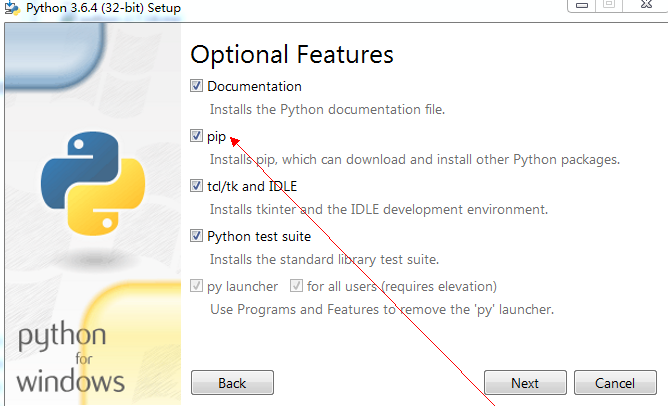
- Install Now vs. Customize Installation: For most users, clicking Install Now is sufficient. This will install Python to a default location (usually
C:\Users\YourName\AppData\Local\Programs\Python\Python3xx) and with default components . If you have a specific need to change the installation directory or select/deselect certain components (like the documentation or pip installer), you can choose Customize installation.
Step 3: Verifying the Installation
- After the installation completes, open the Command Prompt or Windows PowerShell. You can do this by typing
cmdorpowershellin the Windows search bar and pressing Enter. - Type the following command and press Enter:
bash python --version - You should see an output confirming the installed Python version, for example:
Python 3.14.2 - To verify the pip package installer is also working, type:
bash pip --version
This should display the pip version.
If you see these messages, Python 64-bit has been successfully installed and is ready to use .
Chapter 3: Why Python? The Language’s Enduring Appeal
A Language for Everyone
Python’s immense popularity is no accident . It is a high-level, general-purpose language that is remarkably powerful yet accessible. Guido van Rossum created Python in 1991 with a clear philosophy: code should be easy to read and write . This emphasis on clean, understandable syntax is why the Python community often says it feels like “executable pseudocode” .
Key Features That Make Python Special
- Interpreted Execution: Unlike compiled languages like C++ or Java, where you compile your code into a separate executable file, Python is interpreted. This means you can write code and run it instantly, without a separate build step, which makes it incredibly productive for rapid development, prototyping, and scripting. The source code is automatically compiled into an intermediate form called bytecode, which is then executed by the Python Virtual Machine .
- Readable Syntax: Python uses whitespace indentation to define code blocks, which forces a clean and consistent coding style. This makes Python code easier to read, understand, and maintain, especially in collaborative projects .
- Multiple Programming Paradigms: Python is a multi-paradigm language. It supports procedural programming (using functions), object-oriented programming (using classes and objects), and functional programming (using concepts like map, filter, and lambda expressions). This flexibility allows developers to choose the best approach for their problem .
- Dynamic Typing: In Python, you don’t need to declare the type of a variable. The interpreter figures it out when you run the code. This reduces boilerplate code and makes development faster, though it can occasionally lead to type-related errors that are only caught at runtime.
- Automatic Memory Management: Python handles memory allocation and deallocation automatically through a garbage collector. This means you don’t have to worry about manual memory management, eliminating a huge class of bugs common in low-level languages.
- Extensive Standard Library: This is one of Python’s greatest strengths . The standard library is a vast collection of modules and packages that are included with Python. It’s often described as “batteries-included” because you have a powerful set of tools ready to use for a wide range of tasks without needing to install anything else .
Chapter 4: The Power of the Standard Library – A Closer Look
The Python Standard Library is a testament to the language’s philosophy of practicality and power. It covers almost every common programming task you can imagine . Here is a glimpse into some of its most important modules:
Operating System and System Interaction
os: Provides a portable way to interact with the operating system, such as reading and writing environment variables, working with files and directories, and running system commands .sys: Provides access to system-specific parameters and functions, like command-line arguments passed to a script, the Python version, and the standard input/output streams .subprocess: Allows you to spawn new processes, connect to their input/output/error pipes, and obtain their return codes, offering a powerful way to run other programs from your Python script.
File and Data Format Handling
csv: Offers classes and functions to read from and write to CSV (comma-separated values) files, a common data exchange format .json: Encodes and decodes data in JSON (JavaScript Object Notation), the ubiquitous data format used in web APIs and data storage .xml.etree.ElementTree: Provides a simple and efficient API to parse and create XML data.pathlib: Provides an object-oriented way to work with file system paths, making file operations cleaner and less error-prone .configparser: For handling configuration files in a familiar.iniformat .
Text and Data Processing
re: Provides support for regular expressions, a powerful tool for pattern matching and text manipulation .string: Contains a number of useful constants and classes for working with text strings .collections: Provides specialized container data types, likeCounterfor counting hashable objects,defaultdictfor dictionaries with default values, anddequefor efficient double-ended queues .itertools: Offers a collection of tools for creating and working with iterators, allowing for efficient and memory-friendly data processing .functools: Provides higher-order functions (functions that act on other functions) likelru_cachefor memoization andpartialfor fixing a certain number of arguments of a function .
Date, Time, and Mathematics
datetime: Supplies classes for manipulating dates and times .calendar: Offers functions for working with calendars .math: Provides mathematical functions like trigonometric functions, logarithmic functions, and useful constants likepiande.random: Offers functions for generating pseudo-random numbers .
Internet and Web Protocols
http: A collection of modules for working with the HyperText Transfer Protocol.http.servereven provides a simple web server you can launch with a few lines of code .urllib: A package that collects several modules for working with URLs, includingurllib.requestfor opening and reading URLs.smtplib: Defines an SMTP client session object that can be used to send mail to any internet machine with an SMTP listener.
Software Engineering and Development
unittest: Provides a framework for building and running unit tests, ensuring your code works as expected .logging: Offers a flexible framework for emitting log messages from Python programs, which is crucial for debugging and monitoring applications .argparse: Makes it easy to write user-friendly command-line interfaces by parsing command-line arguments .doctest: A unique tool that searches your docstrings for examples of code that look like interactive sessions and then runs those sessions to verify they work as described .
Concurrent Execution
threading: Allows you to run multiple threads of execution in parallel, though the Global Interpreter Lock (GIL) means that Python threads are most useful for I/O-bound tasks .multiprocessing: Offers a way to bypass the GIL by using subprocesses instead of threads, making it suitable for CPU-bound tasks and truly parallel execution .asyncio: Provides a framework for writing asynchronous programs using coroutines, which are excellent for handling many I/O operations concurrently .
This is just a small sampling of the hundreds of modules available, demonstrating how Python provides a robust and feature-rich environment for a vast array of applications.
Chapter 5: Python in the Real World – Applications and Use Cases
Python’s versatility has led to its adoption across a staggering number of fields . Its ability to handle simple scripts and complex, data-intensive applications makes it a tool for almost every profession.
Data Science, Machine Learning, and AI
Python has become the undisputed language of data science. Libraries like NumPy, Pandas, Matplotlib, and SciPy provide powerful tools for data manipulation, analysis, and visualization. For machine learning and artificial intelligence, libraries like TensorFlow, PyTorch, and scikit-learn are used to build and train complex models. The 64-bit version of Python is essential here to handle the massive datasets and complex computations involved.
Web Development
Python is a popular choice for web development, thanks to high-level frameworks like Django and Flask.
- Django: A full-featured, “batteries-included” framework that provides everything you need to build robust web applications, including an ORM, authentication system, and admin interface.
- Flask: A lightweight, “micro” framework that provides the essentials and allows you to pick and choose other components, making it more flexible for smaller or more unique projects.
Automation and Scripting
Python’s simple syntax and cross-platform nature make it ideal for automating repetitive tasks. From writing scripts to rename files, scrape websites, and manage data to creating system administration tools, Python excels at getting mundane work done quickly.
Software Development and Prototyping
Python is often used as a prototyping language. Because it’s so quick to write and test code, developers can rapidly create a proof-of-concept for an application. It is also used in test automation, where frameworks like unittest and third-party tools like pytest are essential.
Education and General-Purpose Programming
Python’s clean, readable syntax makes it an excellent choice for teaching programming concepts . It is now widely used in introductory computer science courses worldwide. Its ease of use and powerful libraries also make it a great tool for personal programming projects, from creating games to building home automation systems.
Frequently Asked Questions (FAQs)
1. What is the main difference between Python 32-bit and Python 64-bit?
The primary difference is the amount of memory (RAM) the interpreter can access. The 32-bit version is limited to about 4GB of RAM, while the 64-bit version can use as much memory as your system has, which is essential for handling large datasets, performing complex calculations, and using modern, memory-intensive libraries . It also allows for better performance on certain tasks and compatibility with modern libraries.
2. How do I check if I have Python 64-bit installed?
Open your command prompt (cmd) or PowerShell and type python to enter the interactive interpreter. The first line of output will include platform information. It will explicitly say “64 bit” if you have the 64-bit version. Alternatively, you can run python -c "import struct; print(struct.calcsize('P') * 8)". A 64-bit system will return 64, while a 32-bit system will return 32.
3. Can I have both 32-bit and 64-bit Python installed at the same time?
Yes, you can have multiple Python versions installed on the same system. This is useful if you need a specific version for legacy projects. However, you must manage your system’s PATH variable and virtual environments carefully to ensure you are running the correct version. When running python from the command line, it will call whichever version is found first in your PATH.
4. What does “Add Python to PATH” do, and why is it so important?
This option adds the directory containing the Python executable (python.exe) to the system’s PATH environment variable. This means you can simply type python in the command prompt to start Python, rather than typing the full path. It is considered a best practice and greatly simplifies the development process by allowing you to run Python scripts and tools (like pip) from any directory .
5. My code works on one computer but fails on another. Is the bitness the issue?
While not always the cause, bitness differences can cause compatibility issues. This is often related to using libraries that are only available in a 32-bit version or if your code relies on external files that are hardcoded to a specific 32-bit path. If your code uses external compiled libraries (like .dll files), you must ensure they match the bitness of your Python interpreter. It’s a good practice to confirm you are using the same version on both systems.
Conclusion
Python 64-bit is the modern, robust, and powerful version of one of the world’s most beloved programming languages. By downloading and installing the 64-bit version from the official Python website, you are ensuring that you can harness the full capabilities of your computer’s hardware. This unlocks the potential to work on large-scale data science projects, build sophisticated web applications, and create complex software without the memory constraints of a 32-bit architecture.
With its remarkably readable syntax, dynamic nature, and the vast, “batteries-included” standard library, Python provides a development experience that is both powerful and enjoyable. Whether you are a seasoned developer, a data scientist analyzing complex datasets, a system administrator automating tasks, or a student taking your first steps in programming, Python 64-bit is an essential tool in your arsenal. It is not just an interpreter; it is a gateway to a world of practical, creative, and professional programming possibilities.