DriverMax 2026 – Is This Driver Updater Still Worth Your Time?
Keeping your Windows PC running smoothly often feels like a constant battle. Between software updates, security patches, and the inevitable slowdown that comes with age, there’s always something demanding your attention. One of the most common sources of system instability and performance hiccups is outdated or incorrect device drivers. Drivers are the crucial pieces of software that allow your operating system to communicate with your hardware, from your graphics card to your mouse. This is where a utility like DriverMax steps in.
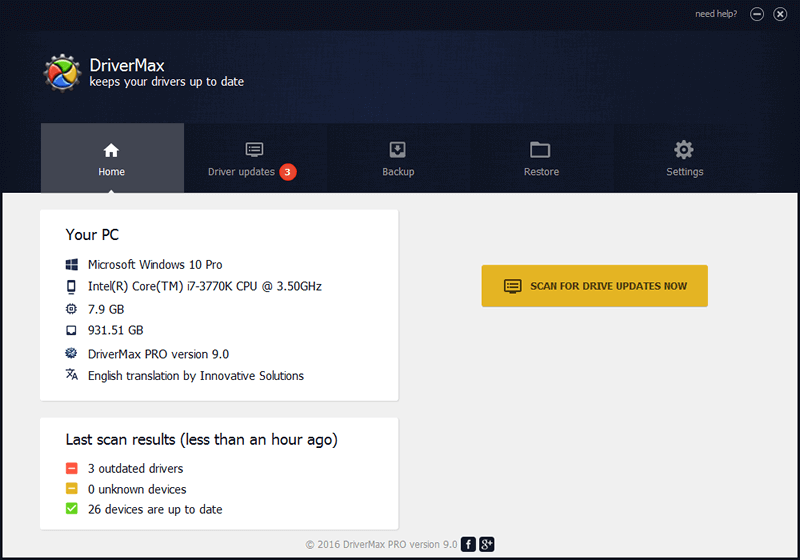
DriverMax is a popular driver management tool designed to simplify the tedious process of finding, downloading, and updating drivers for your Windows PC . It aims to be a one-stop solution for keeping your system stable, improving hardware compatibility, and boosting gaming performance by ensuring all your drivers are current . But is it the right tool for you? This comprehensive review will explore its features, weigh its pros and cons, and help you decide if DriverMax is a helpful assistant or a potential pitfall.
What Exactly is DriverMax?
DriverMax is a software utility developed for Windows that automates the process of managing device drivers . Instead of manually hunting down driver versions from various manufacturer websites, DriverMax scans your system, identifies outdated or missing drivers, and provides direct download links or automates the installation process .
The software is designed for a wide range of users, from casual gamers who want to reduce crashes to anyone who finds the manual driver update process daunting . It boasts a massive online database that supports over 2.3 million devices, making it a comprehensive solution for a variety of PC hardware . A key feature is its ability to back up your existing drivers, allowing you to restore a previous version if a new update causes issues .
Key Features: What Does DriverMax Offer?
DriverMax comes packed with features aimed at making driver management as painless and safe as possible. Here’s a breakdown of its core capabilities.
1. Automated Driver Scanning and Updates
The primary function of DriverMax is to automatically scan your computer for drivers that are outdated, missing, or incompatible. Once the scan is complete, it presents you with a clear report detailing the available updates. You can then choose to download and install the recommended drivers. The Pro version even allows for fully automated installations, taking the hassle out of the process entirely . This feature is especially useful for maintaining system stability, as outdated drivers are a common cause of crashes and performance issues .
2. Backup and Restore Capabilities
One of the most valuable features of DriverMax is its robust backup and restore tool. Before installing any new driver, you have the option to create a backup of your current drivers. This is a critical safety net. If a new driver causes instability or a hardware component stops working, you can easily revert to the previous, working version within a few clicks . The software can also create a system restore point before installation, providing an additional layer of security . For those who frequently reinstall Windows, the backup feature is invaluable, as it allows you to save all your drivers in a single compressed file and restore them quickly after the fresh OS install .
3. Extensive Hardware Database
DriverMax’s effectiveness is largely due to its vast and regularly updated driver database. The software can identify and provide updates for millions of devices and components, ensuring compatibility with a wide range of hardware from various manufacturers . The database is updated frequently to support new hardware and address newly discovered driver issues .
4. Pro Version vs. Free Version
Understanding the difference between the free and Pro versions is crucial, as the experience varies significantly.
| Feature | Free Version | Pro Version |
|---|---|---|
| Core Cost | Free to use | Paid (e.g., $8.66/year for 1 PC, or multi-year licenses for multiple PCs) |
| Daily Download Limit | 2 drivers per day | Unlimited driver downloads |
| Update Automation | Manual download and installation | Automatic driver installation |
| Scheduling | Manual scanning only | Scheduled scans and updates |
| Download Speed | Standard speed | Faster download speeds |
| Support | Basic support | Priority support |
The free version is useful for casual users who only need to update a driver occasionally. However, the strict two-driver-per-day limit can be a major frustration for anyone maintaining a new system or fixing multiple driver issues at once . The Pro version removes these limitations and adds powerful automation features, making it much more convenient for regular use.
User and Expert Reviews: The Verdict
Opinions on DriverMax are mixed, with some users praising its convenience and others expressing significant dissatisfaction. Understanding both sides is essential.
The Good: Efficiency and Safety
On the positive side, many users find DriverMax incredibly efficient and easy to use. It saves the enormous amount of time that would otherwise be spent manually searching for correct driver files . The backup and restore features are widely appreciated as a safety net that provides peace of mind before making system changes . Users with older or less common hardware particularly benefit from the software’s ability to find rare drivers that are difficult to locate elsewhere .
The Bad: Restrictions and Aggressive Marketing
The most common complaints revolve around the free version. The two-driver-per-day limit is seen as overly restrictive, especially when a system may have dozens of outdated drivers . The frequent, sometimes daily, pop-up notifications urging users to upgrade to the Pro version are a major annoyance for many, with some describing it as “spam” . One reviewer on CNET stated that these pop-ups were a “deal breaker” and a primary reason they uninstalled the software .
The Ugly: Compatibility and Trust Issues
Some users have reported more serious problems, including the software installing incorrect drivers that caused devices to malfunction or even led to a blue screen of death . While the software aims to provide the “most appropriate” drivers, it’s not always perfect . A reviewer mentioned an experience where updating a mouse driver stopped the device from working entirely, and an Nvidia driver update was problematic .
Furthermore, DriverMax has been flagged by some security software as a “Potentially Unwanted Program” (PUP) . This classification often stems from its aggressive marketing tactics and the fact that it’s an intermediary for driver downloads, which carries a potential risk. Experts generally recommend downloading drivers directly from the official manufacturer’s website or through Windows Update to minimize security risks, as third-party tools can sometimes bundle unwanted software or point to unverified sources .
Key Pros and Cons
Pros
- Simplifies Maintenance: Automates the tedious process of driver scanning and updating .
- Time-Saving: Quickly finds and recommends drivers for a vast hardware database .
- Backup and Restore: Provides a crucial safety net, allowing you to roll back problematic updates .
- Stability Focus: Helps reduce system crashes and improve compatibility for gaming and productivity .
- Scheduled Updates (Pro): Pro version offers scheduled scans for automated upkeep .
Cons
- Strict Free Limitations: The free version limits users to only two driver downloads per day, a significant drawback .
- Frequent Upgrade Prompts: Persistent pop-up notifications for the Pro version are intrusive .
- Potential for Incompatibility: The software can sometimes suggest or install incorrect or unstable drivers, leading to system issues .
- Mixed User Trust: Some users and security software view it with suspicion, citing concerns about its business practices and potential for overcharging .
- Manual Effort (Free): In the free version, updates are not automated, and you have to manually handle each download .
The Verdict: Should You Use DriverMax?
DriverMax is a powerful and efficient tool for managing drivers, but it comes with significant caveats that make it a poor fit for many users.
For the casual user with one specific driver issue, the free version might be a decent short-term fix. You can use it to scan your system, download the one or two drivers you need, and then uninstall the software to avoid the daily pop-ups. However, relying on it as a long-term solution is not recommended due to its limitations and promotional tactics.
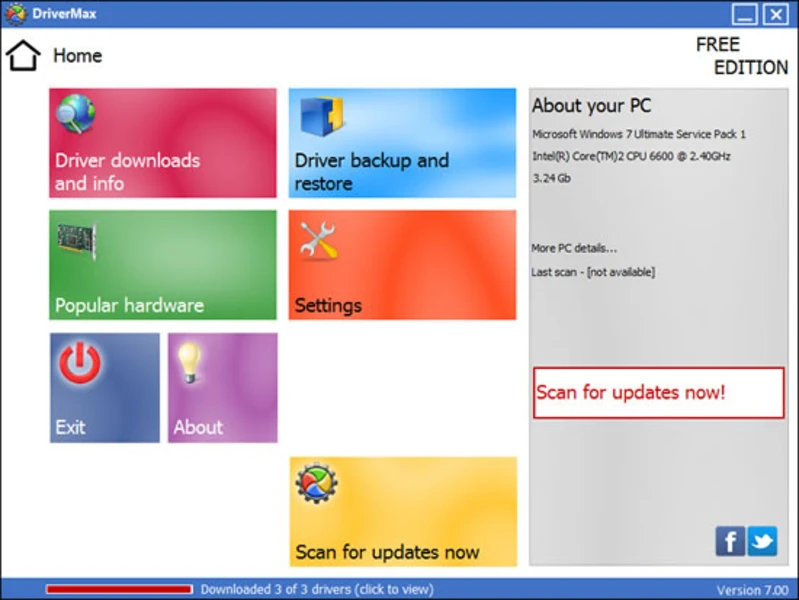
For a more reliable and hassle-free experience, you are better off exploring other options. The software’s aggressive marketing, combined with the real risk of it recommending or installing problematic drivers, can introduce more problems than it solves. Reports of software-related glitches and even malicious flagging should not be taken lightly . The money you might save on a paid license is not worth the potential headache of system instability or the annoyance of daily upgrade prompts.
Ultimately, while DriverMax offers a convenient solution, its drawbacks often outweigh its benefits. For a safer, more controlled driver management approach, stick to the official methods: use Windows Update for general driver packages and visit the manufacturer’s website for critical hardware like graphics cards and motherboards.
Frequently Asked Questions (FAQs)
1. Is DriverMax completely free to use?
DriverMax offers a free version, but it has a critical limitation: you can only download a maximum of two drivers per day. If you need to update more than two drivers, you will have to wait until the next day or upgrade to the paid Pro version .
2. Is DriverMax safe and legitimate?
While DriverMax is a legitimate software utility, its safety is a point of contention. It has been flagged by some anti-malware software as a “Potentially Unwanted Program” (PUP) due to aggressive marketing and its role as a middleman for driver downloads. Some users have also reported it installing incorrect drivers that caused system instability . For maximum security, it is generally recommended to download drivers directly from the hardware manufacturer’s official website.
3. Why does the free version of DriverMax only let me download two drivers a day?
The two-driver-per-day limit is a deliberate restriction designed to encourage users to purchase the paid Pro version. The Pro version removes this limit and offers additional features like automatic installation and scheduled scans. This is the primary way the developers monetize the software .
4. What is the difference between DriverMax Free and Pro?
The main difference is the daily driver download limit. The Free version is limited to two drivers per day, while the Pro version has unlimited downloads. The Pro version also includes automatic driver installation, faster download speeds, the ability to schedule scans, and priority technical support .
5. How do I uninstall DriverMax if I no longer want to use it?
You can uninstall DriverMax like any other Windows program. Go to the Windows Control Panel, find “Programs and Features” (or “Apps & features” on Windows 10/11), locate DriverMax in the list, select it, and choose “Uninstall.” After uninstalling, it is a good practice to restart your computer to ensure any remaining background processes are terminated. Some users have reported that the software’s prompts persist even after uninstallation attempts, so ensure you follow the full uninstall process carefully .